
MIDISketch in Cubase
MIDISketch runs in Cubase and Nuendo 12 and later as a VST3 instrument. Host your synth inside it and every note bends on its own, whatever Cubase does with MPE.
Getting Started
Download & Install
Run the installer for your platform: an .exe on Windows, a .pkg on macOS. It puts the VST3 in the standard VST3 folder, which Cubase scans when it starts. Cubase loads VST3 only, so the VST3 is the one to use (the AU and CLAP are for other DAWs).
Load in Cubase
- Project → Add Track → Instrument.
- In the Instrument field, pick MIDISketch (under Eliotonic), then Add Track.
- Click the instrument's edit button on the track to open MIDISketch's window.
Hosting Synths
The way to per-note bends in Cubase: load the synth inside MIDISketch. MIDISketch sends it MPE directly, so nothing depends on how Cubase routes MIDI.
- In MIDISketch, click Synth in the header, then New Synth (red, top right of the synth panel).
- Load any VST3 synth: Serum 2, Vital, Phase Plant, Pigments, Surge XT or anything installed.
- Inside the hosted synth, turn on MPE and set its pitch bend range to match MIDISketch's,
48by default.VitalOn the Advanced tab, turn on MPE (bottom left) and set the bend range (bottom right) to
48.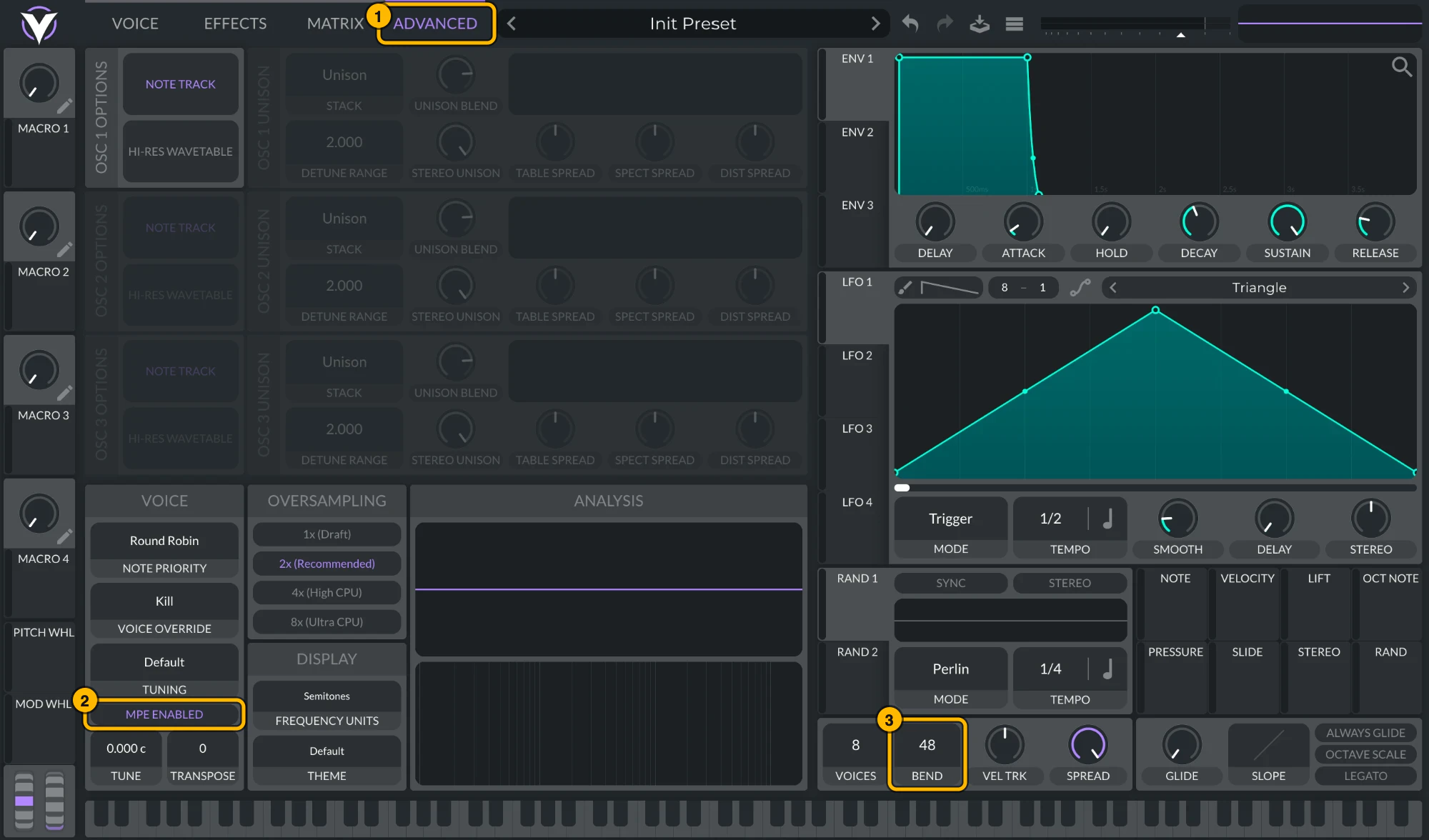
Vital: (1) Advanced, (2) MPE Enabled, (3) bend range 48. Click to see it full size. Serum 2Serum 2 ships with MPE on and a bend range of
48. To check, open its menu: MPE Enabled should be ticked and the MPE bend range at48. To keep MPE on in every new Serum 2, tick MPE enabled by default under Global settings › MPE.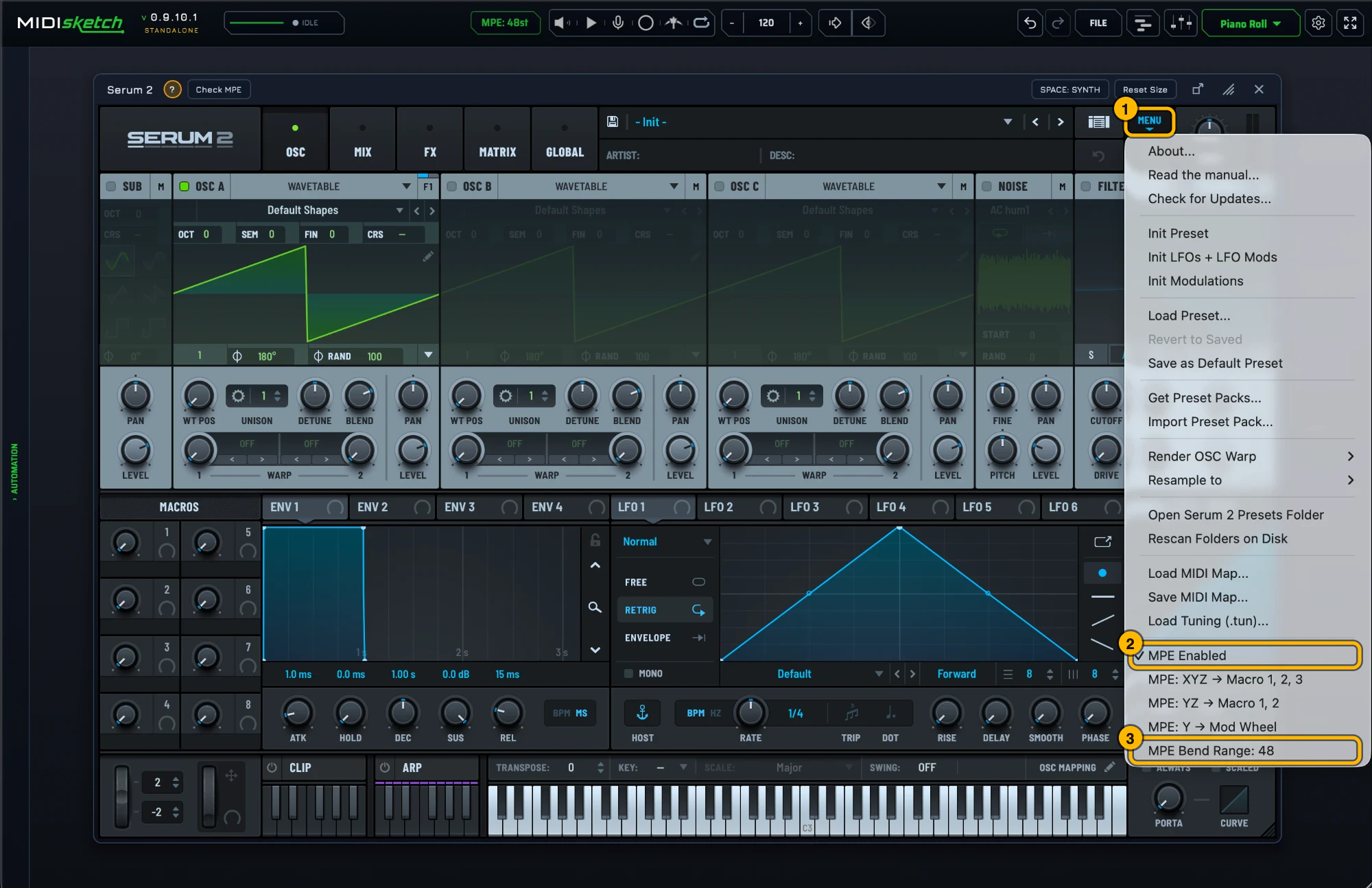
Serum 2's MPE settings. Click to see it full size. Most synths default to a pitch bend range of 2. Bends will sound barely audible until you change this to 48. Alternatively, match MIDISketch's pitch bend range to your synth: settings gear → MIDI Settings... → MPE & PITCH → PITCH BEND (MPE Bend Range in MPE mode, Bend Range in Pitch Wheel mode), or click the MPE: 48st pill in the header, which opens that tab directly. - Not sure of the synth's MPE settings? With it loaded, the strip under the synth shows a green ? with that synth's MPE steps and Check MPE, which tests a hidden copy of the synth: is MPE on, does its bend range match, does it react to pressure and slide.
- Draw notes in MIDISketch's piano roll. Double-click a note to add pitch points and drag them to bend.
- Press play in Cubase. MIDISketch follows Cubase's tempo and transport and plays through the hosted synth.
Arranging in Cubase
To place sections of a sketch on Cubase's timeline, use Trigger mode: click TRIGGER in MIDISketch's playback bar, then put a MIDI part with a note in it on the MIDISketch track. When Cubase reaches the note, the sketch plays for as long as the note is held. Give each section of the roll its own note in MIDI Trigger Setup to arrange several. See Trigger Mode.
To bring notes you already have in Cubase into MIDISketch, export the part as a MIDI file and drop it on the roll, or play it into MIDISketch with REC armed. See Notes Already in a DAW Clip.
To take MIDI back out, drag from MIDISketch's DRAG MIDI button onto a Cubase track. The notes always come through; per-note bends need an instrument on that track that takes MPE.
Tips
- Send MIDISketch's MIDI to another Cubase track instead of hosting the synth inside it? That route has not been tested in Cubase yet. For per-note bends, host the synth inside MIDISketch.
- If MIDISketch goes quiet while Cubase plays with no MIDI part on its track, turn off Suspend VST3 plug-in processing when no audio signals are received under Studio → Studio Setup → VST Plug-ins.
- Make MIDISketch's window bigger or smaller by dragging its bottom-right corner; UI Scale in User Preferences sizes everything inside it.
 FL Studio
 Ableton Live
 Logic Pro
 REAPER
 Bitwig Studio
 Pro Tools
 LMMS
LMMS