
MIDISketch in Bitwig Studio
There are two ways to use MIDISketch in Bitwig: as the track's instrument with your synth loaded inside it, or as MIDISketch MIDI FX in front of any instrument. With the CLAP, it can also play Bitwig's own devices, like Polymer, with every note bending on its own.
MIDISketch as the Instrument
The simplest way. MIDISketch is the track's instrument and your synth plays inside it. The VST3 and the CLAP both work.
- Install MIDISketch from the download page. If Bitwig doesn't list it, rescan your plug-ins in Bitwig's settings.
- In Bitwig's browser, find MIDISketch and drag it onto an Instrument Track.

MIDISketch in Bitwig's browser. - Click the Synth button in MIDISketch's toolbar and load your synth, for example Vital, Serum 2 or Phase Plant.
- For per-note bends, use an MPE synth: turn on its MPE and set its pitch bend range to
48.VitalOn the Advanced tab, turn on MPE (bottom left) and set the bend range (bottom right) to
48.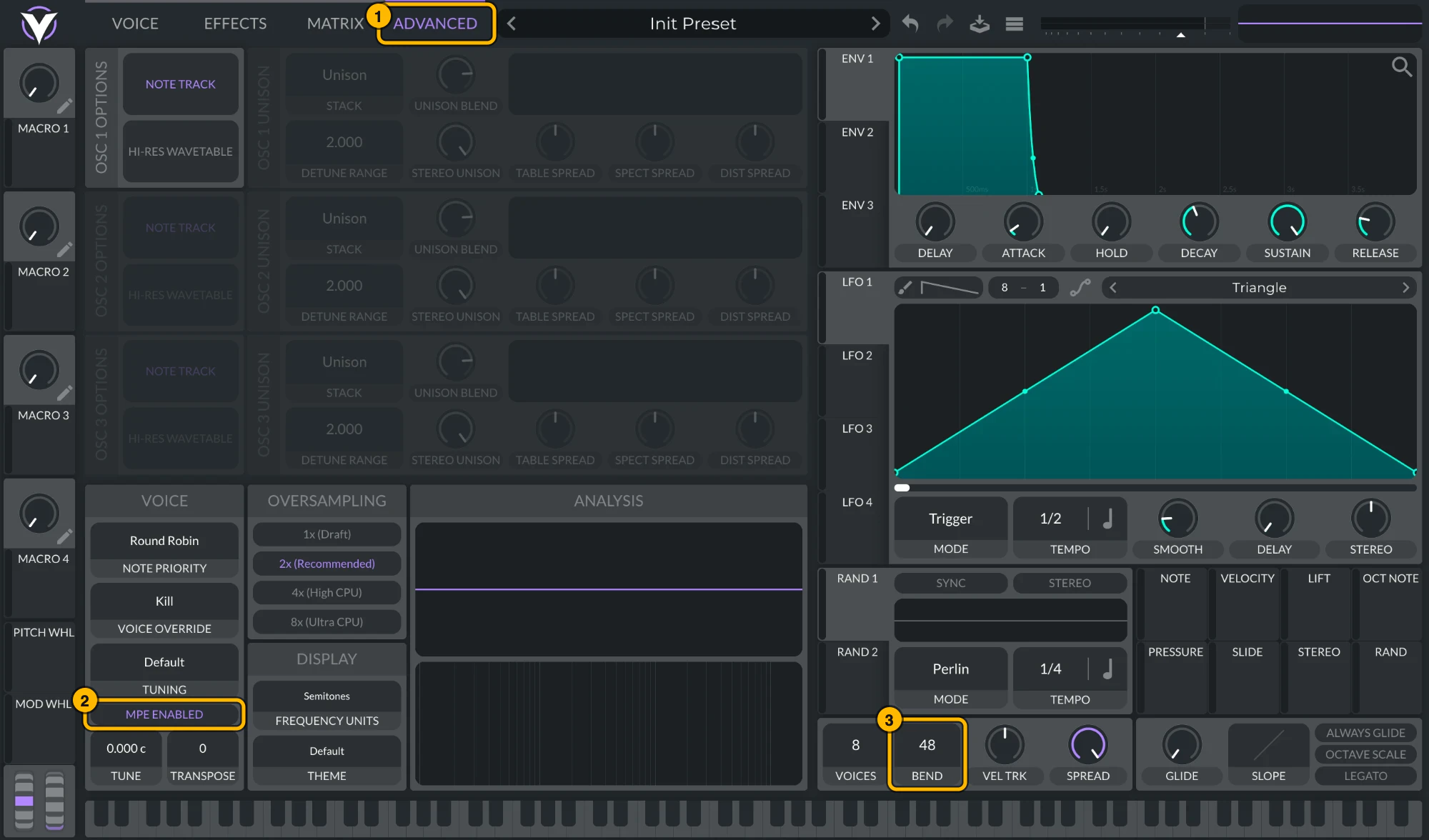
Vital: (1) Advanced, (2) MPE Enabled, (3) bend range 48. Click to see it full size. Serum 2Serum 2 ships with MPE on and a bend range of
48. To check, open its menu: MPE Enabled should be ticked and the MPE bend range at48. To keep MPE on in every new Serum 2, tick MPE enabled by default under Global settings › MPE.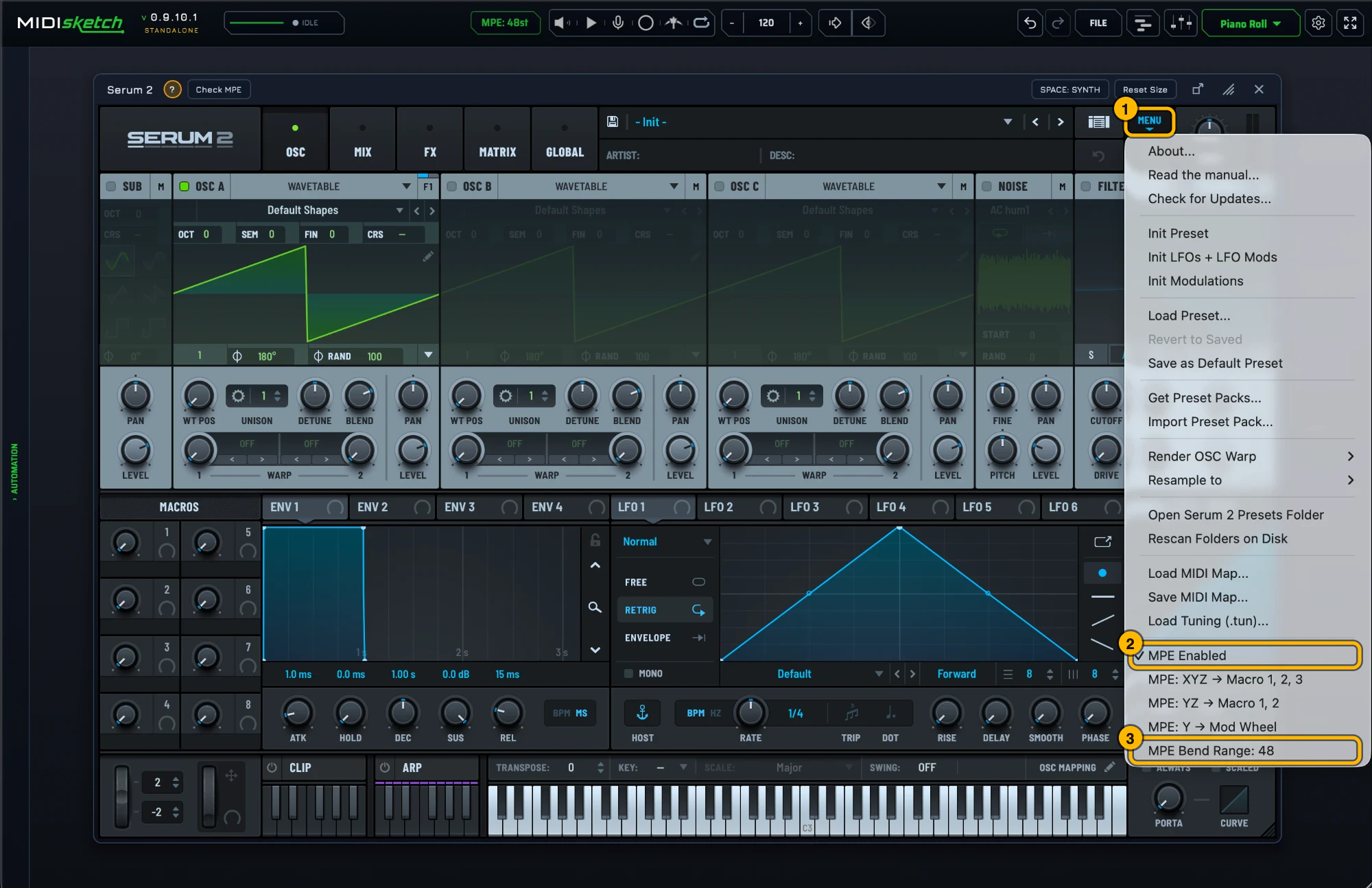
Serum 2's MPE settings. Click to see it full size. - The pill at the top of MIDISketch shows its bend range. It should read MPE: 48st.

The pill, reading MPE: 48st. Synth stuck at another range? Set MIDISketch to match instead: settings gear › MIDI Settings... › MPE & PITCH › PITCH BEND. Clicking the pill opens the same tab.
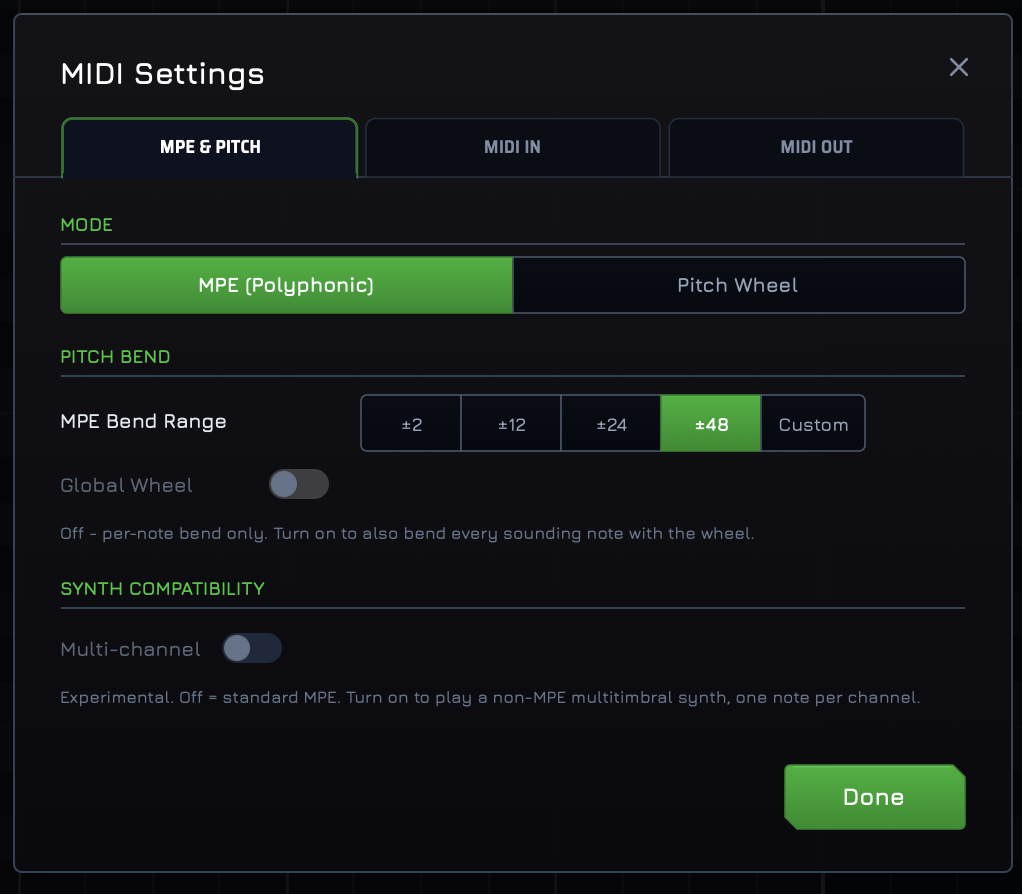
MIDI Settings, MPE & PITCH tab, bend range 48. - Draw notes and pitch curves, and press play.
MIDISketch MIDI FX
MIDI FX is MIDISketch as a note effect. It goes first in the track's device chain and plays the instrument after it, with no second track and no routing. It only sends notes, so it has no synth inside and the parts that need audio are hidden.
Get It
MIDI FX comes with the MIDISketch installer, as a box you tick. It installs next to MIDISketch, not in place of it, and includes the CLAP.
Windows: choose Custom installation and tick MIDISketch MIDI FX. macOS: in the installer's list, tick MIDISketch MIDI FX for other DAWs (VST3 + CLAP). Already have MIDISketch? Run the installer again with that box ticked. Every download is also on the download page.
Set It Up
- On an Instrument Track, add MIDISketch MIDI FX first in the device chain. Take the CLAP: it keeps MPE, the VST3 doesn't.

MIDISketch MIDI FX in Bitwig's browser. - Add your instrument after it: Polymer or another Bitwig device, or an MPE synth.
- For Bitwig's own devices, turn on Per-note bends (below). For an MPE synth, turn on its MPE and set its bend range to
48. - Draw in MIDISketch MIDI FX and press play. The instrument after it plays every note.
Playing Bitwig's Own Devices
Polymer, Phase-4, the Grid and Bitwig's other instruments bend each note on its own once one switch is on. It works with the CLAP only, in MIDISketch and MIDISketch MIDI FX alike.
- Load the CLAP of MIDISketch or MIDISketch MIDI FX, with the Bitwig device after it in the same chain.
- Click the settings gear, open MIDI Settings..., go to the MIDI OUT tab and turn on Per-note bends under BITWIG.
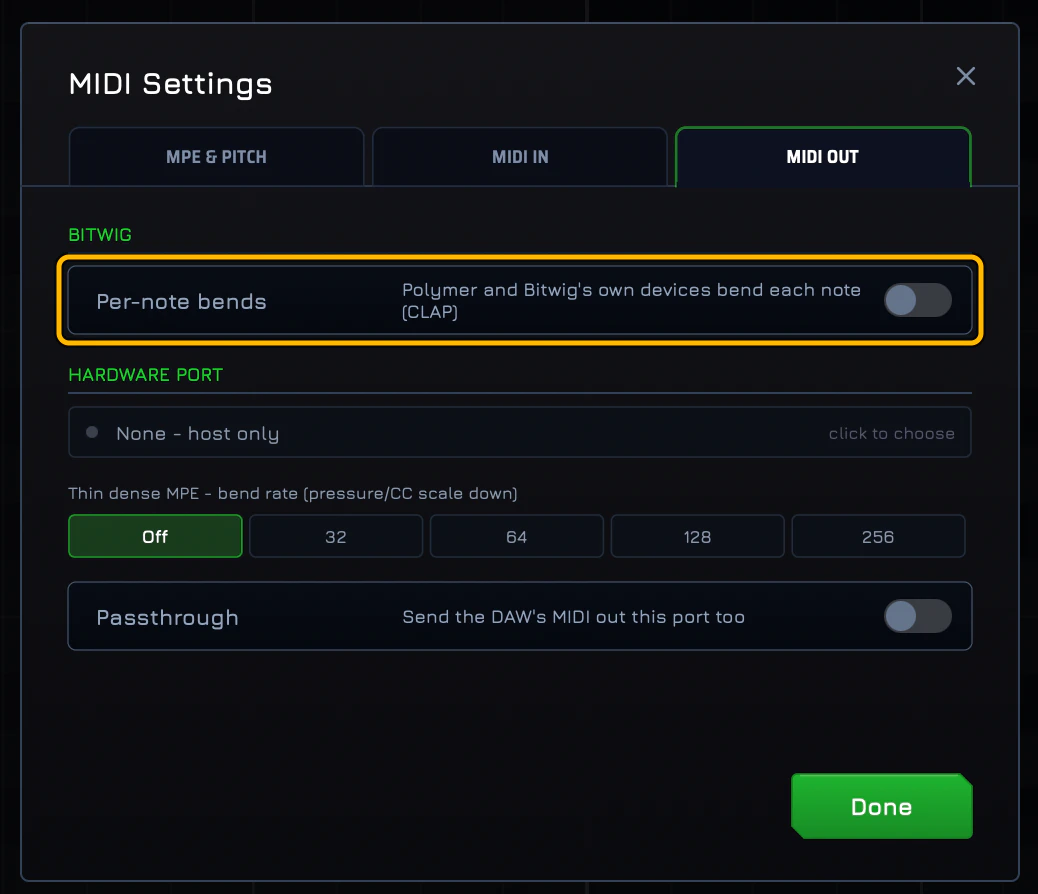
Per-note bends, shown off here: turn this on. The same switch is in User Preferences... › GENERAL as Bitwig devices: per-note.
- Draw and press play. Each note bends on its own.
An MPE synth such as Serum 2 doesn't need the switch: turn on MPE in the synth and set its bend range to 48. To play a device on another track, add a Note Receiver on that track and pick MIDISketch as its source.
Troubleshooting
Notes play but don't bend in Polymer
Turn on Per-note bends in MIDI Settings, MIDI OUT tab, under BITWIG. It works with the CLAP only.
No MPE through MIDISketch MIDI FX
You loaded the VST3. Swap it for the CLAP of MIDISketch MIDI FX.
Bends sound wrong in an MPE synth
Set the synth's pitch bend range to 48 to match MIDISketch. The pill at the top of MIDISketch shows its range.
An MPE synth stopped bending after I turned on Per-note bends
Per-note bends is only for Bitwig's own devices. Turn it off for an MPE synth, or, for a VST3 synth, turn on Use MPE on that plugin in Bitwig.
MIDISketch doesn't show up in Bitwig
Rescan your plug-ins in Bitwig's settings and check that the plug-in folder is listed. The CLAP installs to C:\Program Files\Common Files\CLAP\ on Windows, /Library/Audio/Plug-Ins/CLAP/ on macOS and ~/.clap/ on Linux.
Quick Tips
- As the instrument, the VST3 or the CLAP. For MIDI FX and Bitwig's own devices, the CLAP.
- MPE synths: bend range
48, so the pill reads MPE: 48st. - Per-note bends turns MIDISketch's own synth off while it's on.
- Linux: put the CLAP .tar.gz in
~/.clap/. MIDI FX is for Windows and macOS. - Use the Standalone app to sketch ideas without opening Bitwig.
- What MIDI FX is for, and which DAWs take it, is in the docs.
 FL Studio
 Logic Pro
 Ableton Live
 REAPER
 Pro Tools