
MIDISketch in Logic Pro
The best way to use MIDISketch in Logic is MIDISketch MIDI FX. It sits on your synth's track and plays that synth with per-note bends, whether it's Vital, Serum 2 or Logic's own Alchemy. You can also load MIDISketch as an instrument and host a synth inside it.
Recommended: MIDISketch MIDI FX
MIDISketch MIDI FX is MIDISketch as a MIDI effect. It goes in a track's MIDI FX slot, in front of the instrument, and plays it. No second track and no MIDI routing.
Download & Install
MIDISketch MIDI FX comes with the MIDISketch installer for macOS. In the installer's list, MIDISketch MIDI FX for Logic (Audio Unit) is ticked by default, so a normal install puts it next to MIDISketch.
Installed MIDISketch before 0.9.10.1? Run this installer over it: it adds MIDI FX, or updates the one you have. Every download is also on the download page.
Set It Up
- Create a Software Instrument track with your synth as the instrument, for example Vital, Serum 2 or Logic's Alchemy.
- Click the track's MIDI FX slot, just above the instrument slot on the channel strip, and choose Audio Units › Eliotonic › MIDISketch MIDI FX. It's filed under the maker's folder, Eliotonic, not under MIDISketch.
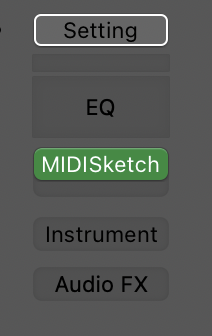
MIDISketch MIDI FX in the MIDI FX slot 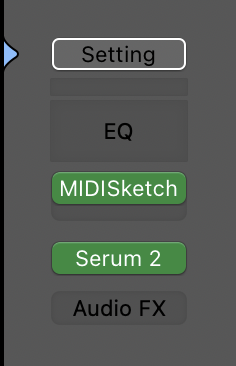
Recommended: MIDI FX above Serum 2 - Turn on MPE in the synth and set its pitch bend range to
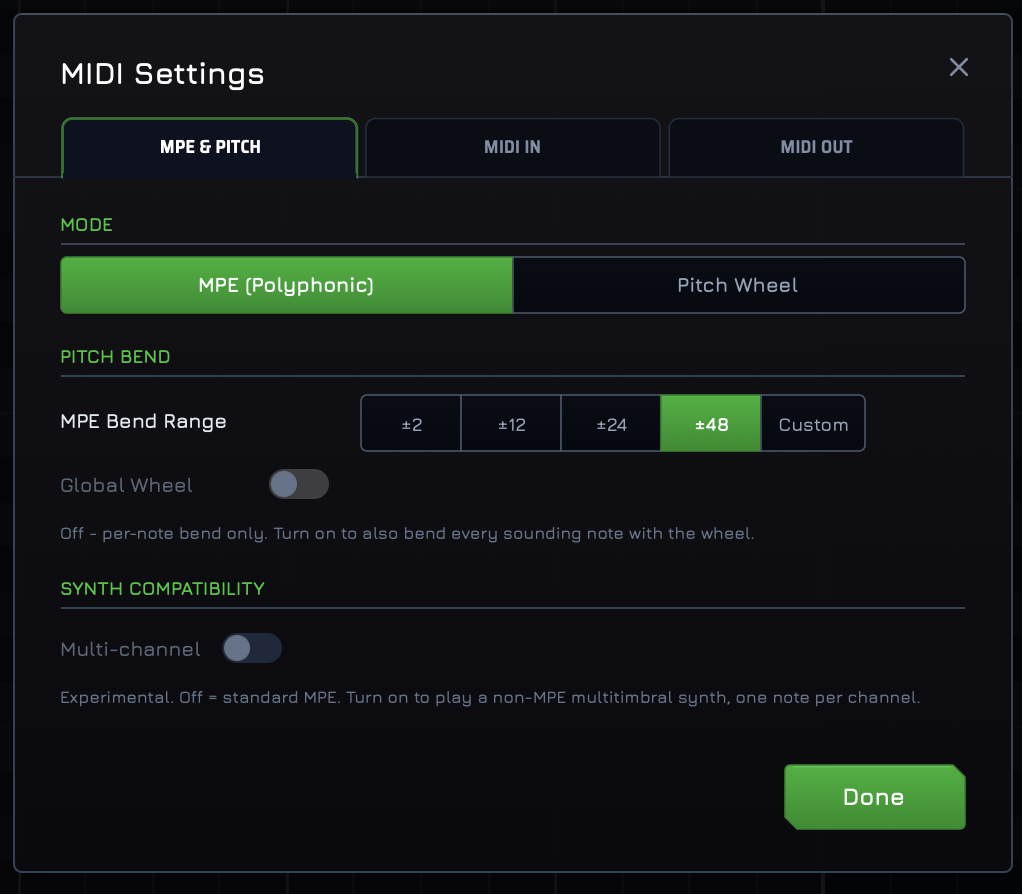
48. Each synth's settings are below. - In MIDISketch, the pill at the top should read MPE: 48st.

The pill at the top of MIDISketch, reading MPE: 48st. - Draw notes in MIDISketch and press play in Logic.
Synth Settings
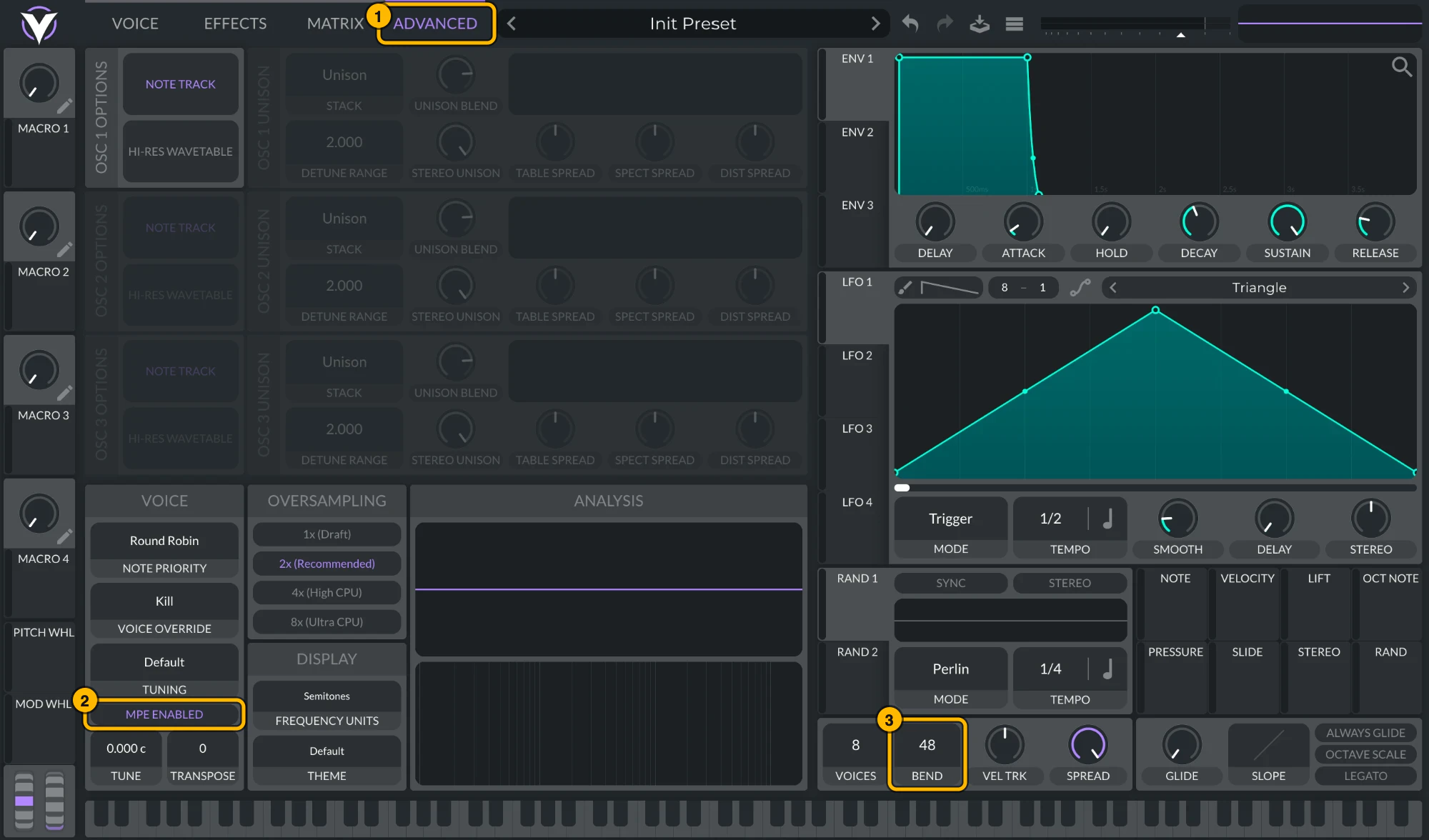
On the Advanced tab, turn on MPE (bottom left) and set the bend range (bottom right) to 48.
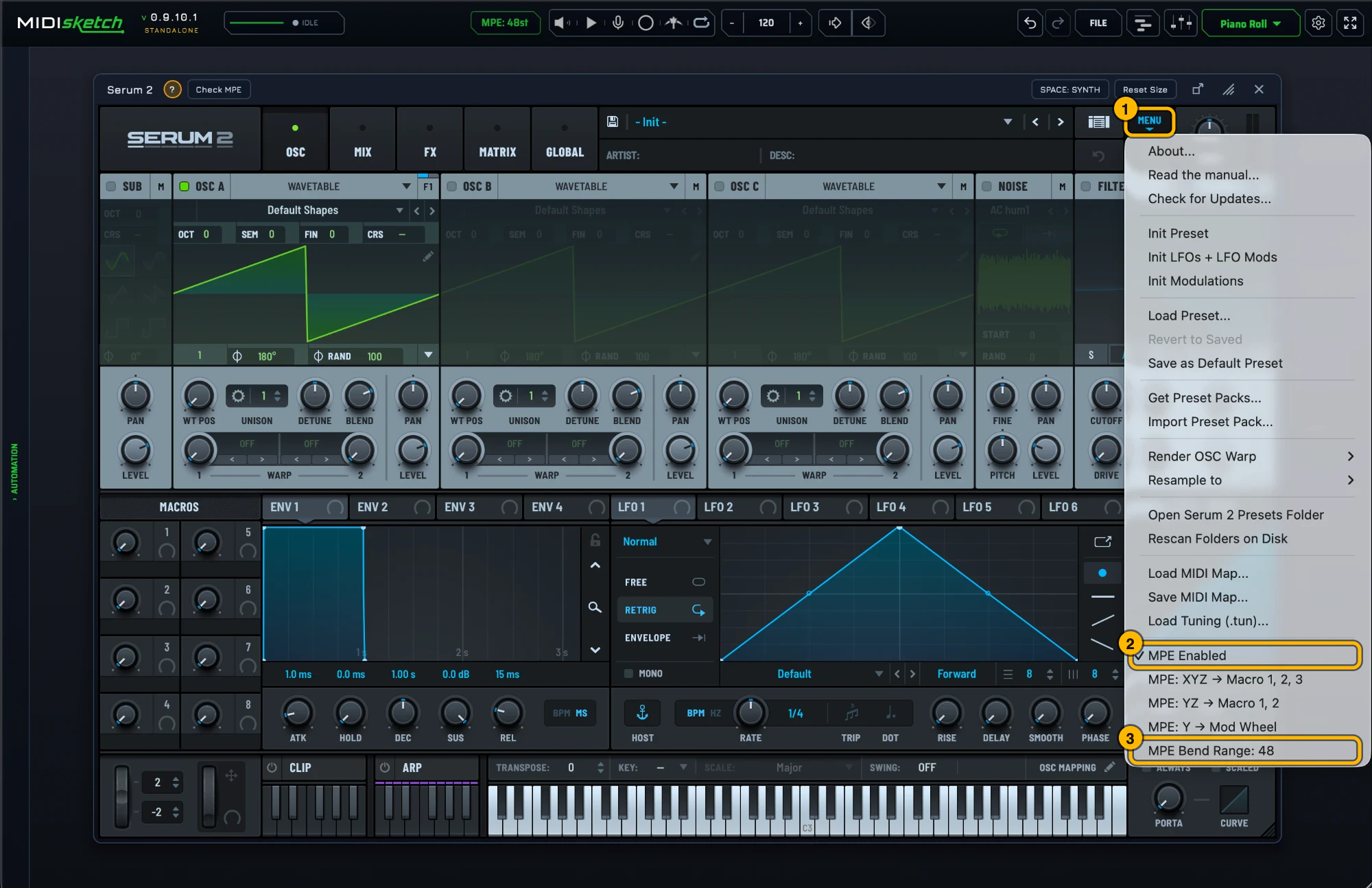
Serum 2 ships with MPE on and a bend range of 48. To check, open its menu: MPE Enabled should be ticked and the MPE bend range at 48. To keep MPE on in every new Serum 2, tick MPE enabled by default under Global settings › MPE.
Click the small arrow at the bottom left of the plugin window to show the extended settings. Set MIDI Mono Mode to On (Base Channel 1) and Mono Mode Bend Range to 48. Logic's other MPE instruments work the same way.

Synths Without MPE
Some synths, like Nexus, have no MPE. Click the MPE pill at the top of MIDISketch and switch it to PW (Pitch Wheel), then set the synth's pitch bend range to match MIDISketch's Pitch Wheel range. Bends then move the whole synth together, not each note on its own.
Another Way: MIDISketch on Its Own Track
MIDISketch also loads as a track's instrument and hosts your synth inside it (checked with Vital). Use this for Voice to MIDI and the other parts that need audio.
Download & Install
Run the macOS installer (.pkg) from the download page. The Audio Unit is included and selected by default, and lands in /Library/Audio/Plug-Ins/Components/. The VST3 and CLAP from the same installer are for other DAWs.
Load It on a Track
-
Create a Software Instrument track: Track › New Software Instrument Track.
Wrong track type. An Audio track has no Instrument slot. MIDISketch will never appear if you're on an Audio track. -
Click the Instrument slot, the slot at the top of the channel strip, above the Audio FX slots.
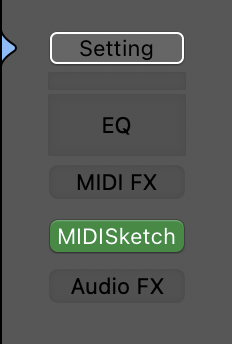
MIDISketch in the Instrument slot Wrong slot. MIDISketch is an AU Instrument. It will never appear in the Audio FX slot, and the MIDI FX menu only lists MIDISketch MIDI FX. Browsing "Audio Units" from an FX slot and seeing nothing does not mean it isn't installed. -
Choose AU Instruments › Eliotonic › MIDISketch › Stereo.
Manufacturer folder, not product name. MIDISketch is filed under "Eliotonic". It does not appear alphabetically under "MIDISketch", scroll to the E section and look for Eliotonic.Or search from this slot: type
midisketchOne word, no space, and only from the Instrument slot. Searchingmidi sketch(with a space) returns nothing anywhere in Logic. The correct spelling ismidisketch. Also, Logic's plugin-picker search only covers plugins valid for the slot you clicked, so even the correct spelling finds nothing if you're searching from an Audio FX slot.
Host a Synth Inside It
- Click the Synth button in MIDISketch's toolbar to open the plugin browser.
- Load any AU or VST3 synth: Vital, Serum 2, Phase Plant, Pigments, or anything installed on your system.
-
Inside the hosted synth, turn on MPE and set the pitch bend range to
48semitones, as in Synth Settings.Most synths default to a pitch bend range of 2. Bends will sound barely audible until you change this to 48. Alternatively, match MIDISketch's pitch bend range to your synth: settings gear → MIDI Settings... → MPE & PITCH → PITCH BEND (MPE Bend Range in MPE mode, Bend Range in Pitch Wheel mode), or click the MPE: 48st pill in the header, which opens that tab directly. - Not sure of the synth's MPE settings? With it loaded, the strip under the synth shows a green ? with that synth's MPE steps (general tips if there is no guide for it) and Check MPE, which tests a hidden copy of the synth: is MPE on, does its bend range match MIDISketch's, does it react to pressure and slide. If a synth is missing from the browser, Scan for all VSTs... in its menu finds every installed plugin; the scan doesn't run on its own.
- Place notes, draw pitch curves, and press play. Everything plays through the hosted synth in real time.
Route to a Logic Instrument
Logic's own instruments (Alchemy, ES2, Retro Synth) can't be loaded inside MIDISketch. MIDI FX is the easy way to play them. With the instrument version, for example when you use Voice to MIDI, route its MIDI to a Logic instrument on a second track:
- Create an instrument track and load MIDISketch on it. Write your MIDI inside MIDISketch.
- Create a second instrument track with an MPE-capable Logic instrument (Alchemy, ES2, etc.).
- On the second track, open the Inspector (press
I). - In the Track Inspector (top left), click "Internal MIDI In" → "Instrument Output" → select the MIDISketch instance.
- Open the Logic instrument, click the small arrow at the bottom left, and set MIDI Mono Mode to On (Base Channel 1) and Mono Mode Bend Range to
48. - On the second track, press Record. MIDISketch's MIDI plays through the Logic instrument.
Voice to MIDI in Logic
Voice to MIDI needs the instrument version of MIDISketch, since MIDI FX has no audio. MIDISketch's voice tracking needs audio, and Logic gives an instrument no audio input of its own. The installer includes a second Audio Unit, MIDISketch Audio Send, which carries the mic to MIDISketch over a voice bus.
- On the audio track with your mic, add MIDISketch Audio Send in an Audio FX slot. It is filed under its manufacturer folder like the instrument is, or search
midisketchfrom that slot. - Turn on input monitoring for that track (the I button) or record-enable it, so live mic audio passes through the plugin.
- In MIDISketch Audio Send choose Bus A. It reads Connected once MIDISketch is listening.
- In MIDISketch click MIC in the header, open the voice panel's INPUT tab and set its Bus box to A. The header turns green: Audio in: MIDISketch Audio Send bus A.
- Select the MIDISketch track while you sing. Logic runs the selected software instrument in live mode with its smallest buffer, so notes land sooner.
MIDISketch's Side Chain menu in Logic's plugin header can stay at No Side Chain; the bus does the routing. Every bus message and its fix is listed in the docs under Audio Send and the Voice Bus.
Troubleshooting
"I can't find MIDISketch MIDI FX"
It comes with the MIDISketch installer from 0.9.10.1. Run the macOS installer again and check that MIDISketch MIDI FX for Logic (Audio Unit) is ticked. Then look in the track's MIDI FX slot, just above the instrument slot, under Audio Units › Eliotonic.
"I don't see MIDISketch in Audio Units when adding a plugin"
You are in an Audio FX slot. Instruments never appear there. Click the Instrument slot at the top of the channel strip on a Software Instrument track (see MIDISketch on Its Own Track).
"Search finds nothing"
Check both: (1) are you searching from the Instrument slot? (2) did you type it as one word, midisketch, not midi sketch?
"No plugins found in the selected file" when loading a synth
Update that synth to its latest version. An old Intel-only build won't load on an Apple Silicon Mac.
Bends are tiny or barely audible
The synth's bend range has to match MIDISketch's. Set the synth to 48 and check that the pill at the top of MIDISketch reads MPE: 48st.
Only one note of a chord plays or bends
The preset is mono or legato. Pick a polyphonic patch, such as a pad.
Verify install via Plug-in Manager
Go to Logic Pro › Settings › Plug-in Manager and search midisketch (one word, no space, here too). If the row says "failed validation", select it and click "Reset & Rescan Selection".
If MIDISketch (the instrument) fails again, run this in Terminal and send us the last ~20 lines:
auval -v aumu Mskh Msct
Still not appearing after a fresh install
Logic's first AU scan after install can require a full quit and reopen. Quit Logic completely (⌘Q) and relaunch.
Quick Tips
- Best experience: MIDISketch MIDI FX in your synth track's MIDI FX slot.
- Set the synth's pitch bend range to
48. The pill at the top of MIDISketch should read MPE: 48st. - For chord bends, use a polyphonic patch. Mono and legato presets play one note at a time.
- Logic hosts Audio Units only. The VST3 and CLAP in the same downloads are for other DAWs.
- Logic for iPad is not supported.
- Use the Standalone app to sketch ideas without opening Logic.
- Requires macOS 10.15 Catalina or later.
- Improvements for Logic are coming in a future update.
 FL Studio
 Ableton Live
 REAPER
 Bitwig Studio
 Pro Tools