
MIDISketch in Pro Tools
MIDISketch runs in Pro Tools as a native AAX plugin on Windows and macOS. It is signed with PACE, so it loads in a normal Pro Tools install, and the synth you host inside it hears every note bend on its own.
Get the AAX build
Download it for Windows or macOS on the Pro Tools page. Same license and same 7-day trial as every other format.
What You Need
- Pro Tools, a recent version. Tested on Pro Tools 2026.4.
- MIDISketch AAX, a .zip for Windows or a .pkg for macOS, from the Pro Tools page
- A synth to host inside MIDISketch, or its built-in one
Install the AAX
- Close Pro Tools before installing.
- Windows: unzip the download and copy every
.aaxpluginfolder intoC:\Program Files\Common Files\Avid\Audio\Plug-Ins. - macOS: open the
.pkgand click through. It installs MIDISketch and MIDISketch Audio Send into/Library/Application Support/Avid/Audio/Plug-Ins. - Open Pro Tools. MIDISketch shows up under Instrument in the plugin list.
Both downloads also include MIDISketch Audio Send, an AAX effect listed under Other in the insert menu, not Instrument. It carries a mic track to MIDISketch’s voice tracking over a bus: insert it on the mic track and pick Bus A, then in MIDISketch click MIC, open the voice panel’s INPUT tab and set Bus to A. Every bus message and its fix is in the docs under Audio Send and the Voice Bus.
Set Up a Track
- Create an Instrument Track and insert MIDISketch from the Instrument plugins.
- Inside MIDISketch, click the Synth button to host an MPE-compatible synth (Serum, Vital, Phase Plant, etc.), or use the built-in one.
- Enable MPE in the hosted synth and set pitch bend range to
48semitones.VitalOn the Advanced tab, turn on MPE (bottom left) and set the bend range (bottom right) to
48.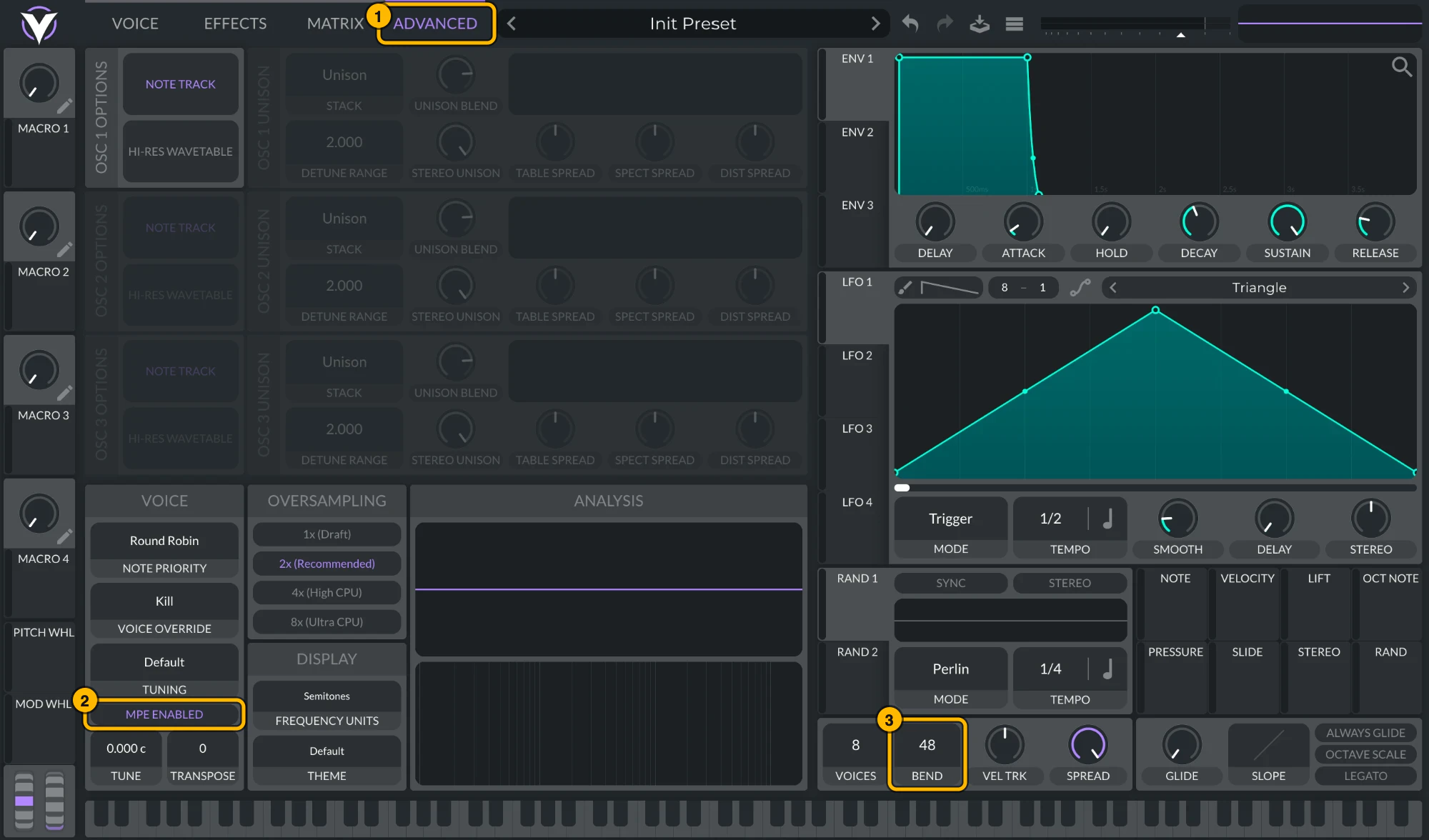
Vital: (1) Advanced, (2) MPE Enabled, (3) bend range 48. Click to see it full size. Serum 2Serum 2 ships with MPE on and a bend range of
48. To check, open its menu: MPE Enabled should be ticked and the MPE bend range at48. To keep MPE on in every new Serum 2, tick MPE enabled by default under Global settings › MPE.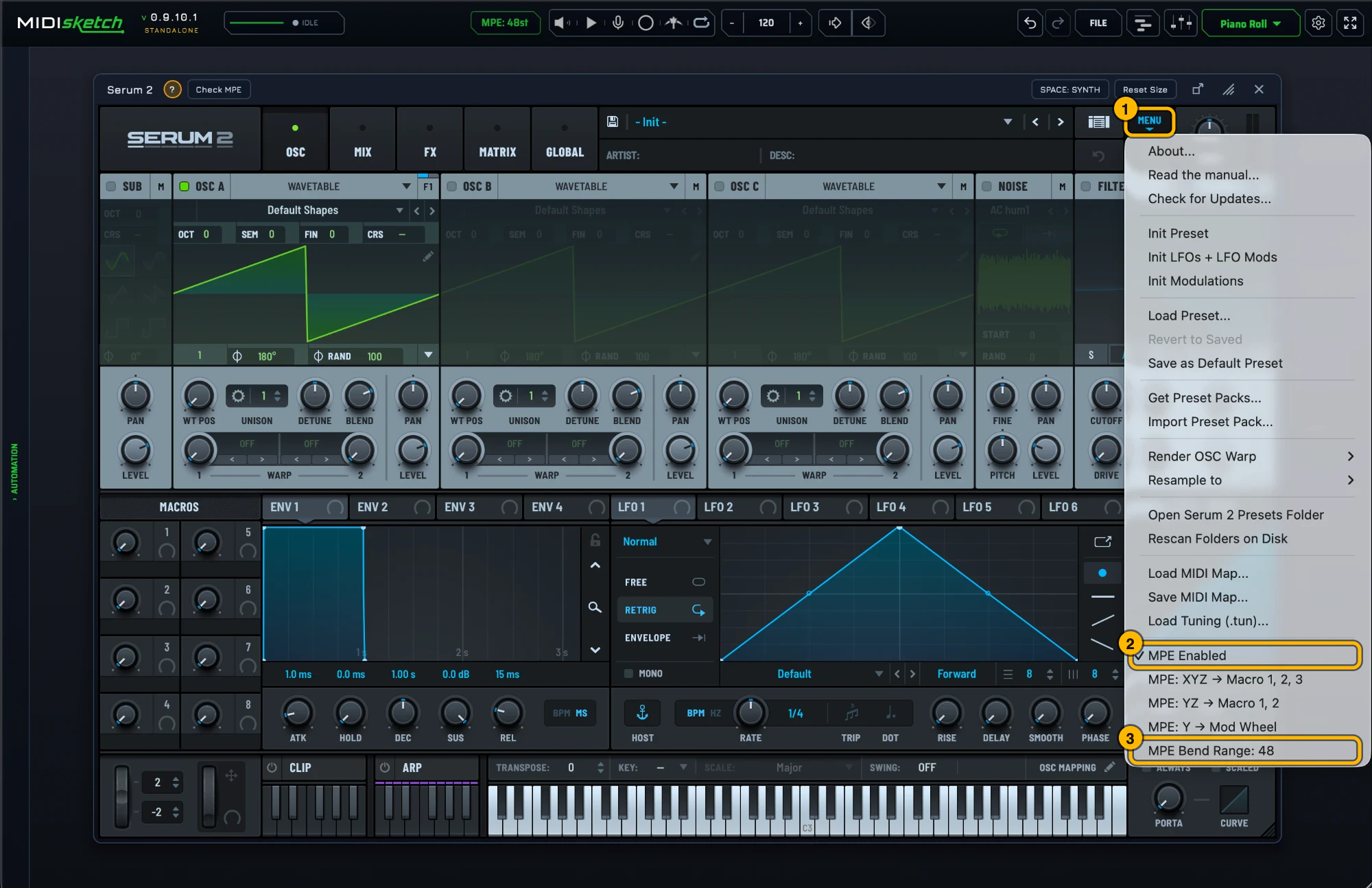
Serum 2's MPE settings. Click to see it full size. Most synths default to a pitch bend range of
2. Bends will sound barely audible until you change this to48. Alternatively, match MIDISketch's pitch bend range to your synth: settings gear → MIDI Settings... → MPE & PITCH → PITCH BEND (MPE Bend Range in MPE mode, Bend Range in Pitch Wheel mode), or click the MPE: 48st pill in the header, which opens that tab directly. - Not sure of the synth's MPE settings? With it loaded, the strip under the synth shows a green ? with that synth's MPE steps (general tips if there is no guide for it) and Check MPE, which tests a hidden copy of the synth: is MPE on, does its bend range match MIDISketch's, does it react to pressure and slide. If a synth is missing from the browser, Scan for all VSTs... in its menu finds every installed plugin; the scan doesn't run on its own.
- Draw notes and pitch curves in MIDISketch's piano roll, then press play in Pro Tools.
Already Using PatchWork?
Blue Cat's PatchWork, a VST3 host that runs inside Pro Tools as AAX, still works if you prefer it. Insert PatchWork on an Instrument Track as an AAX plugin, load MIDISketch (VST3) in an empty slot, then follow the track setup above from step 2.
Parameter automation from Pro Tools to plugins inside PatchWork requires mapping through PatchWork's parameter system.
Good to Know
- Per-note pitch bending works when hosting synths inside MIDISketch, the MPE happens inside the plugin, independent of Pro Tools.
- MIDISketch's Standalone app works on its own too: sketch ideas there, then export MIDI files into Pro Tools.
Pro Tools does not support MPE natively. Standard pitch wheel from MIDISketch will affect all notes on the channel simultaneously.
Confirmed Working With
- Native AAX, MIDISketch v0.9.9.7 to v0.9.10.1, on Windows and macOS
- Pro Tools 2026.4
- Pro Tools 2025 + PatchWork on Windows 10/11, MIDISketch v0.9.7.5+
Guides for Other DAWs
Get MIDISketch for Pro Tools, Free Trial
AAX + VST3 + AU + CLAP · macOS & Windows · Lifetime License