
MIDISketch in Reaper
Reaper's flexible routing and lightweight architecture make it an excellent host for MIDISketch. Load it as a VSTi, host your synth inside, and start drawing per-note pitch curves.
Getting Started
Download & Install
Download the installer for your platform. Windows uses an .exe, macOS uses a .pkg that installs VST3, AU, and CLAP. On Linux, download the VST3 or CLAP tarball.
Load in Reaper
On any track, click the FX button. In the FX browser, search for MIDISketch under VST3 instruments (VSTi). Add it to the track.
Options → Preferences → VST and rescan.Hosting Synths
The simplest approach, load your synth directly inside MIDISketch. Reaper's lightweight plugin hosting means virtually any VST3 synth works.
- Click the Synth button in MIDISketch's toolbar to open the plugin browser.
- Load any VST3 synth, Serum, Vital, Phase Plant, Pigments, Surge XT, or anything installed.
- Inside the hosted synth, enable MPE mode and set pitch bend range to
48semitones.VitalOn the Advanced tab, turn on MPE (bottom left) and set the bend range (bottom right) to
48.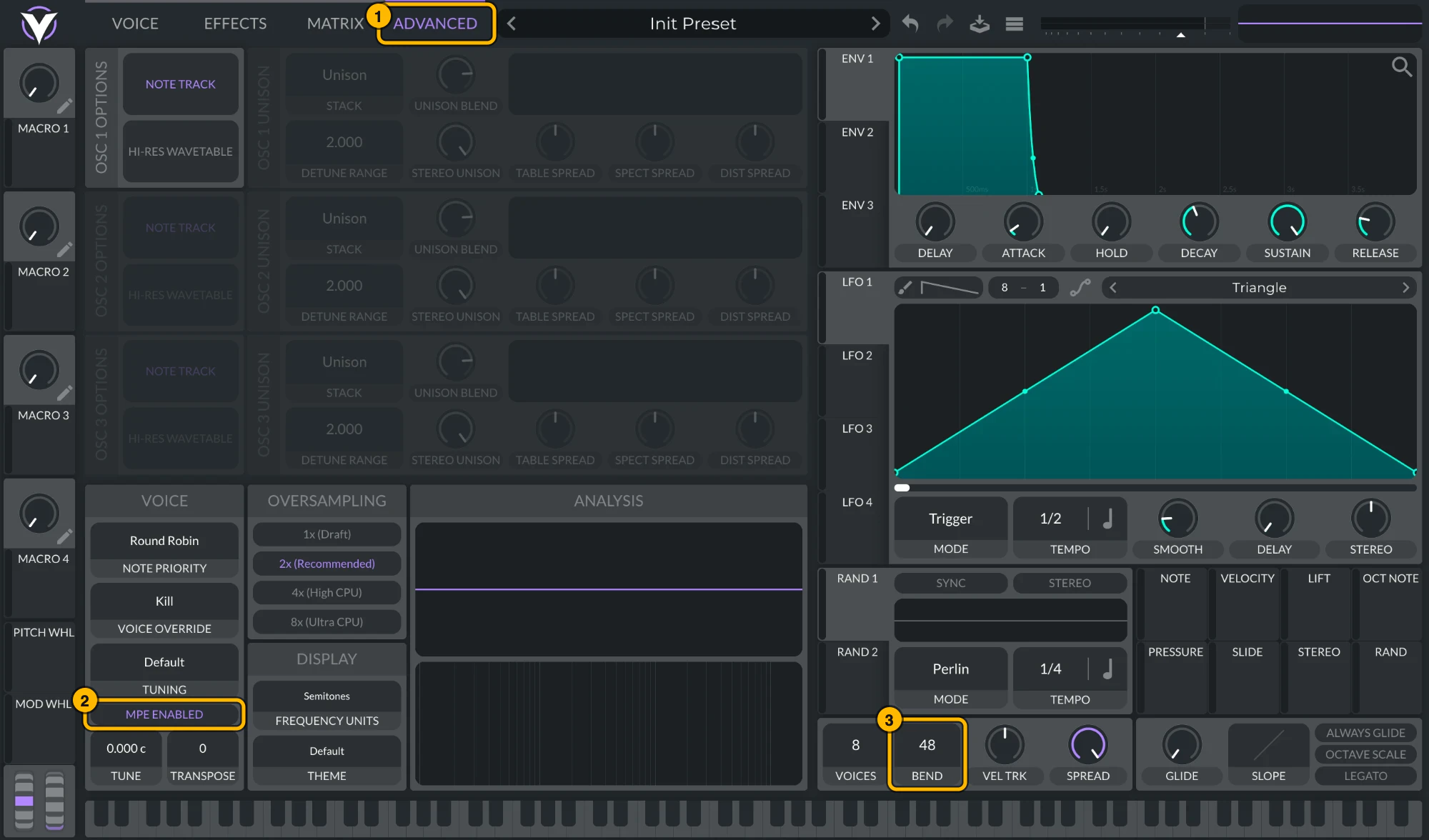
Vital: (1) Advanced, (2) MPE Enabled, (3) bend range 48. Click to see it full size. Serum 2Serum 2 ships with MPE on and a bend range of
48. To check, open its menu: MPE Enabled should be ticked and the MPE bend range at48. To keep MPE on in every new Serum 2, tick MPE enabled by default under Global settings › MPE.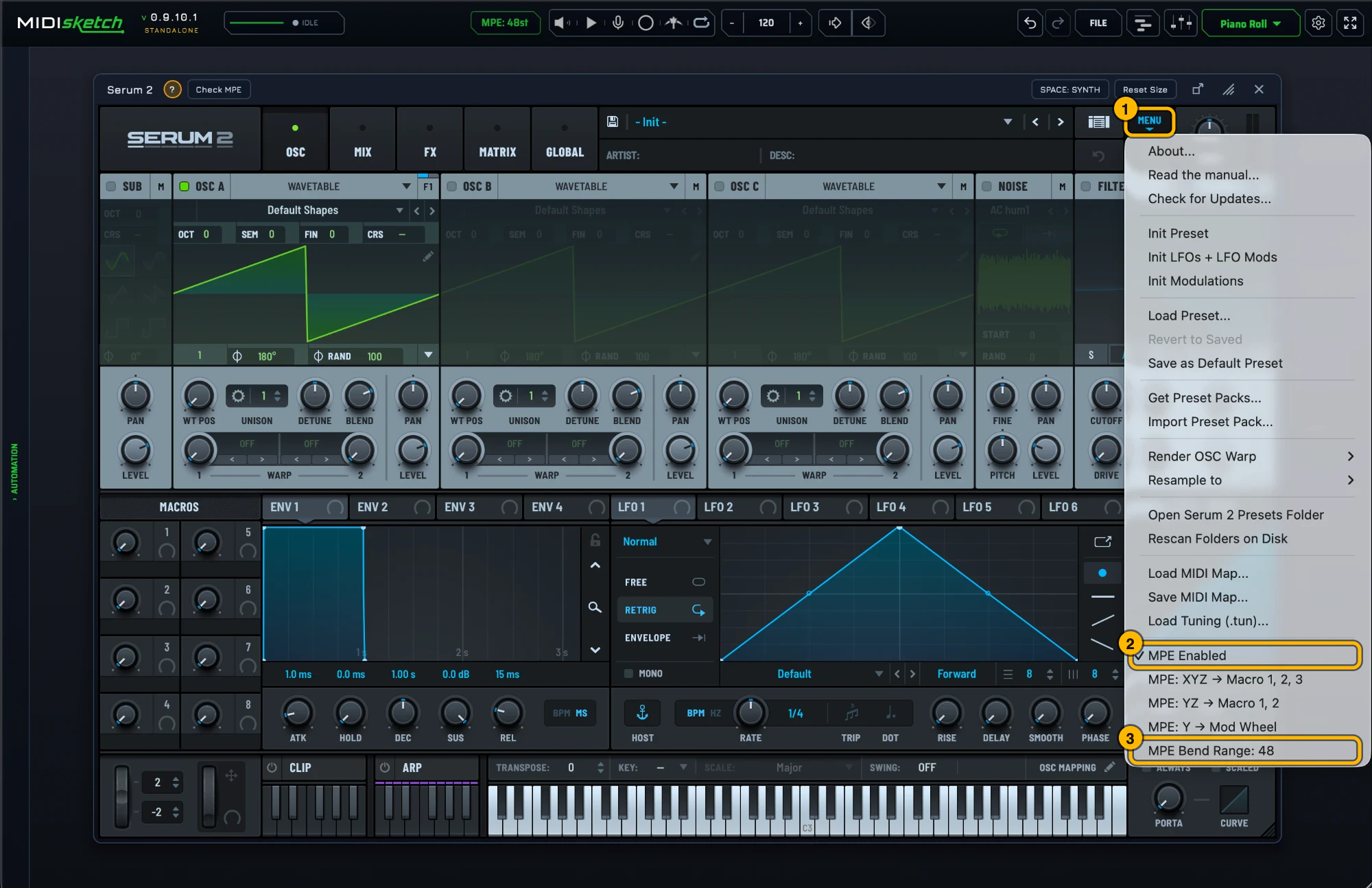
Serum 2's MPE settings. Click to see it full size. Most synths default to a pitch bend range of 2. Bends will sound barely audible until you change this to 48. Alternatively, match MIDISketch's pitch bend range to your synth: settings gear → MIDI Settings... → MPE & PITCH → PITCH BEND (MPE Bend Range in MPE mode, Bend Range in Pitch Wheel mode), or click the MPE: 48st pill in the header, which opens that tab directly. - Not sure of the synth's MPE settings? With it loaded, the strip under the synth shows a green ? with that synth's MPE steps (general tips if there is no guide for it) and Check MPE, which tests a hidden copy of the synth: is MPE on, does its bend range match MIDISketch's, does it react to pressure and slide. If a synth is missing from the browser, Scan for all VSTs... in its menu finds every installed plugin; the scan doesn't run on its own.
- Place notes in MIDISketch's piano roll. Double-click to add pitch points, drag to create bends and glides.
- Press play in Reaper. Everything plays through the hosted synth in real time.
Why Reaper
- Reaper supports full MPE pass-through natively
- Lightweight, MIDISketch + hosted synth runs efficiently
- Flexible routing for complex MPE setups
- VST3, CLAP, and AU all supported
- Works on Windows, macOS, and Linux
- Export MIDI or drag-and-drop into Reaper items
Guides for Other DAWs
VST3 + AU + CLAP + AAX · macOS, Windows & Linux · Lifetime License