
PolyRack
Per-note sound for any synth. PolyRack is MIDISketch's plug-in rack. Load any synth and PolyRack plays it as linked copies, one per note, so every note in a chord can bend, swell and slide on its own, even on synths that were never built for that.
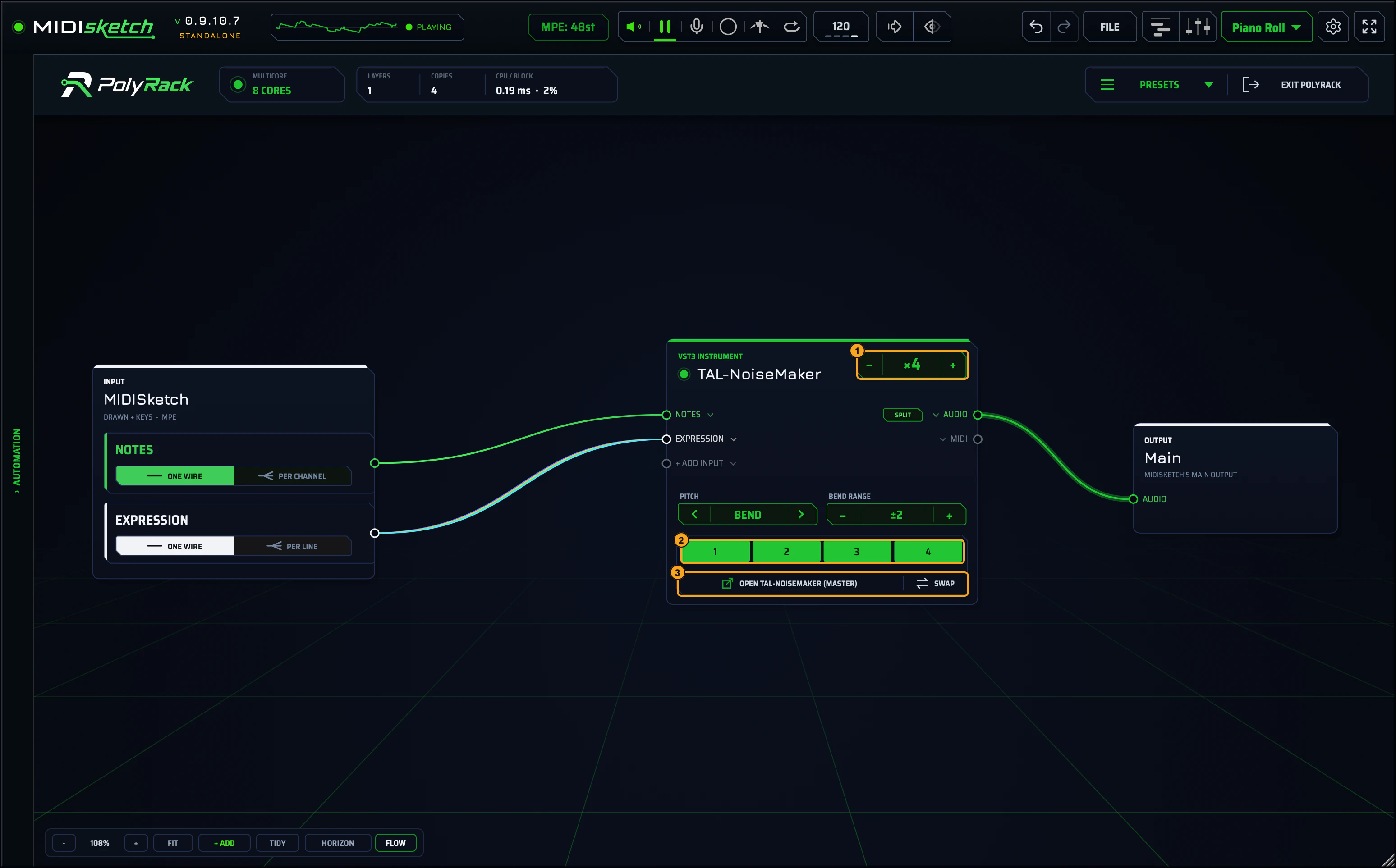
The − xN + stepper sets how many notes play at once: x4 plays a four-note chord.
One cell per copy, lit while it plays a note. Click a cell to open that copy’s own window and change it: good for per-note variations.
OPEN … (MASTER) opens the master window. What you change there reaches every copy at once.
MPE (MIDI Polyphonic Expression) lets every note carry its own pitch bend, pressure and slide. A normal synth receives one pitch bend for the whole instrument: bend one note and the whole chord bends. An MPE synth keeps each note separate.
MIDISketch draws and sends MPE. PolyRack is how you hear it on synths that don’t speak MPE.
The basics
Opening PolyRack
Three ways in, all on the Sound page:

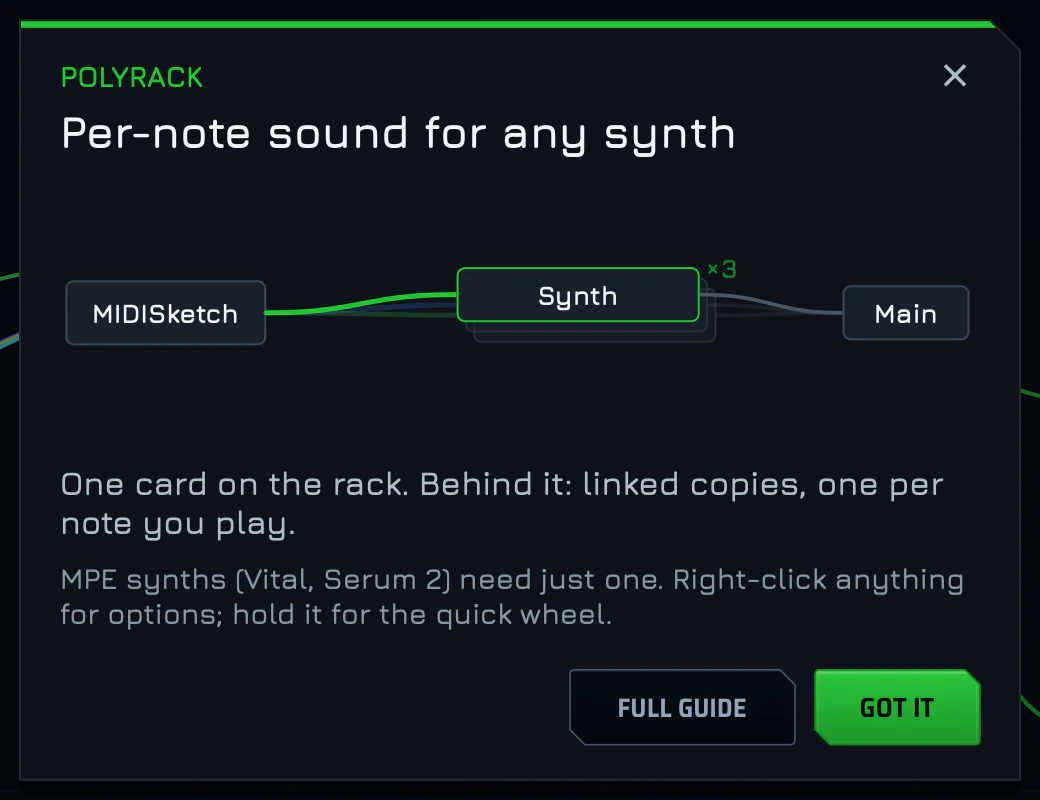
EXIT POLYRACK (top right of the rack) leaves it. The first time PolyRack opens, a short card shows the idea: one card on the rack, linked copies behind it. FULL GUIDE brings you here, GOT IT closes it, and + ADD › PolyRack guide brings it back.
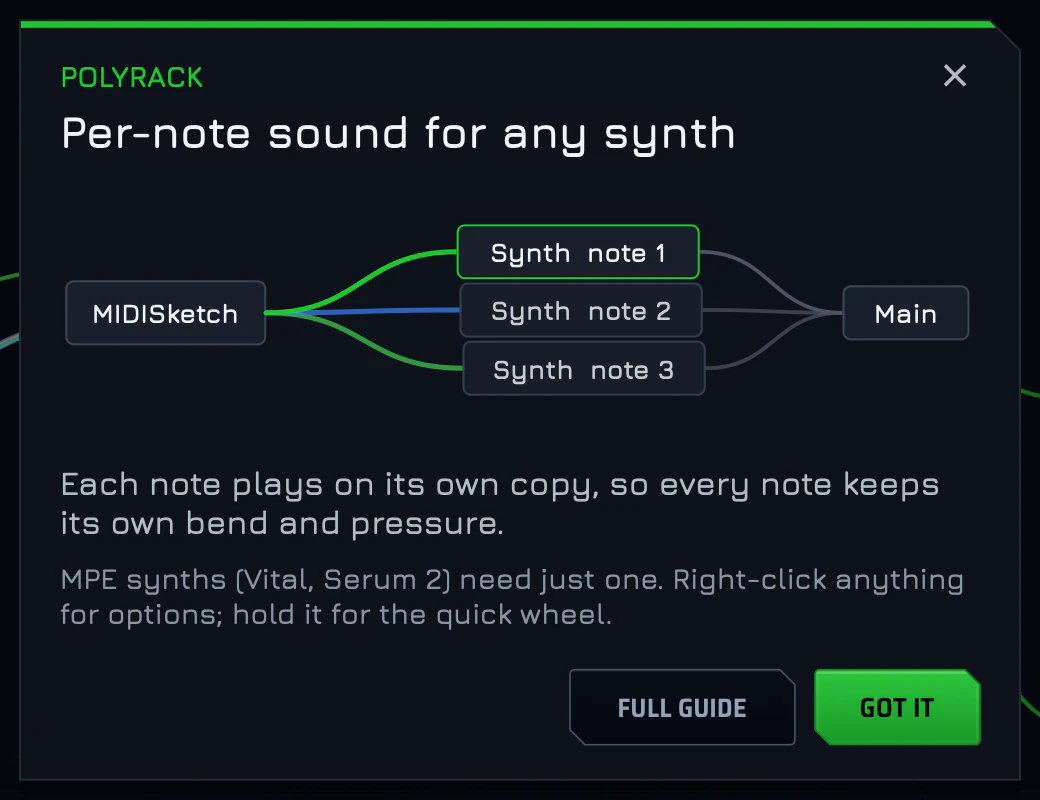
Copies: one note per copy
A synth on the rack is a layer card. Behind it are its copies: identical, linked instances of the same synth. Each note you play goes to a free copy, so each note gets its own bend and pressure. True per-note expression, on any synth.
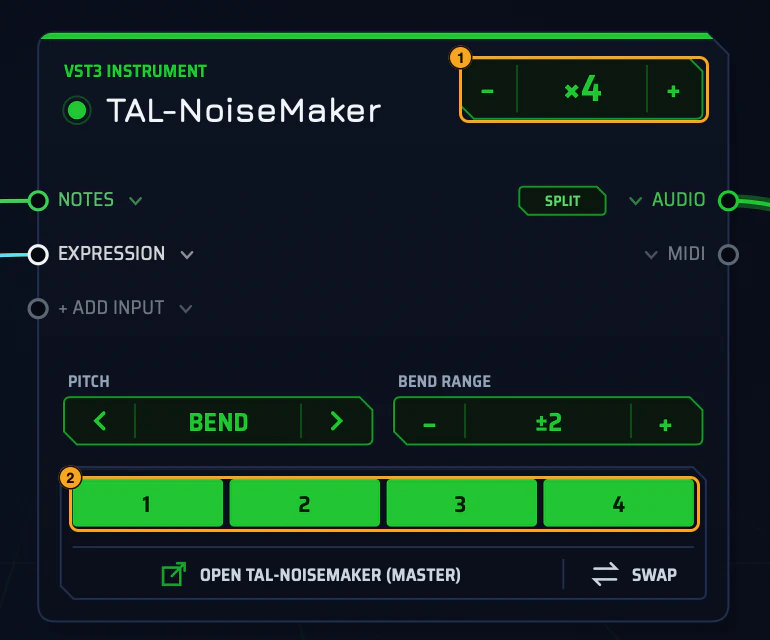
- 1The copies stepper: x4 means four notes at once.
- 2One cell per copy, lit while it plays.
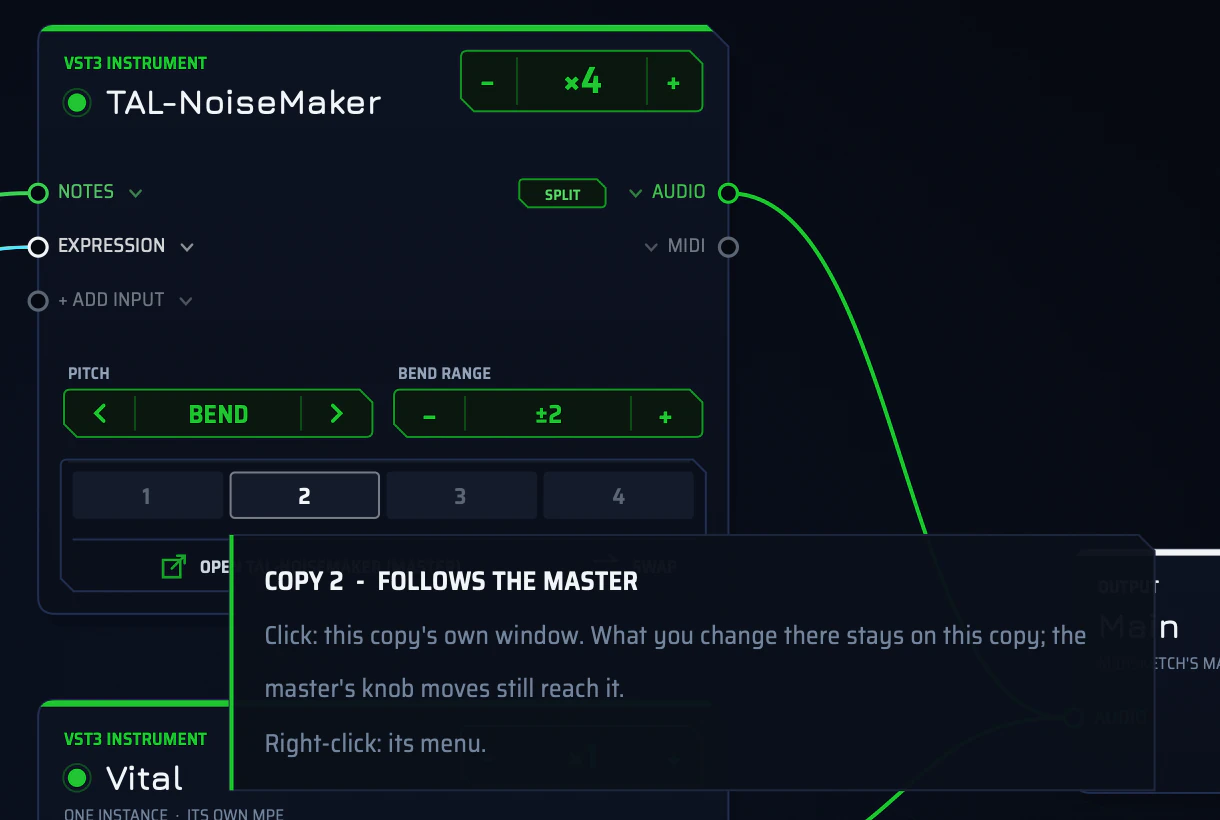
Play more notes than there are copies and the new note takes the copy that was released longest ago, so tails ring on. A held note is only taken over when every copy is busy.
Synth windows, the master’s and each copy’s, have an AUTO | PINNED switch: PINNED keeps the window above everything. In a DAW on a Mac they open in front of MIDISketch.
MPE synths: one instance
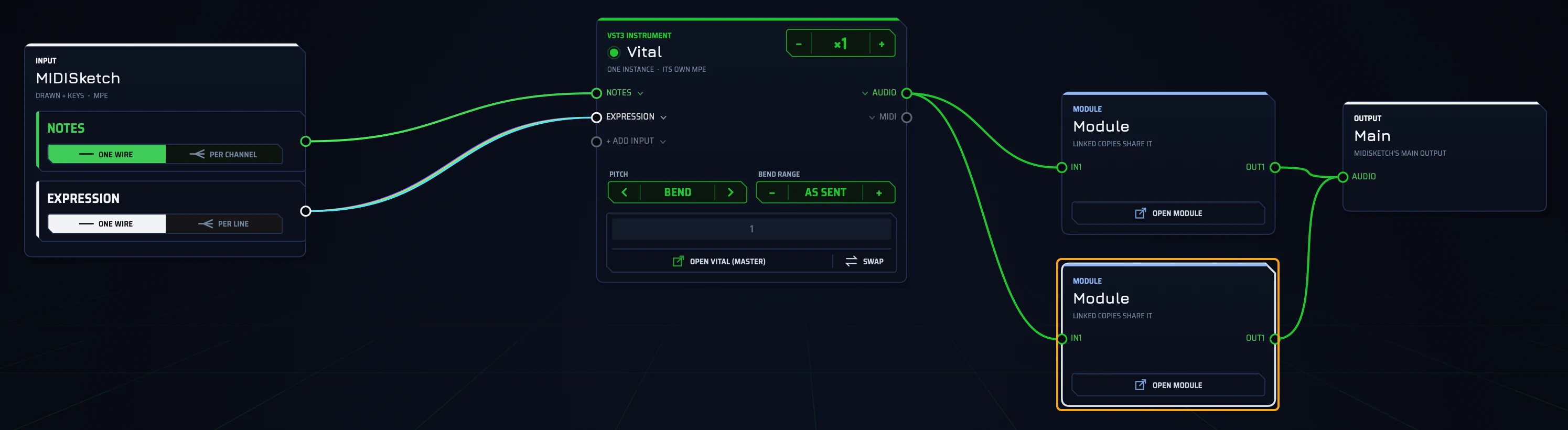
Synths that already speak MPE, like Vital, Serum 2 and Surge XT, don’t need copies. PolyRack plays them as one instance that receives MIDISketch’s MPE directly: the card says ONE INSTANCE · ITS OWN MPE, and the bend range shows AS SENT. Synths on MIDISketch’s verified MPE list open this way; everything else opens as copies.
Mix both in one rack, up to 8 synth layers. Every layer plays every note unless you filter them.
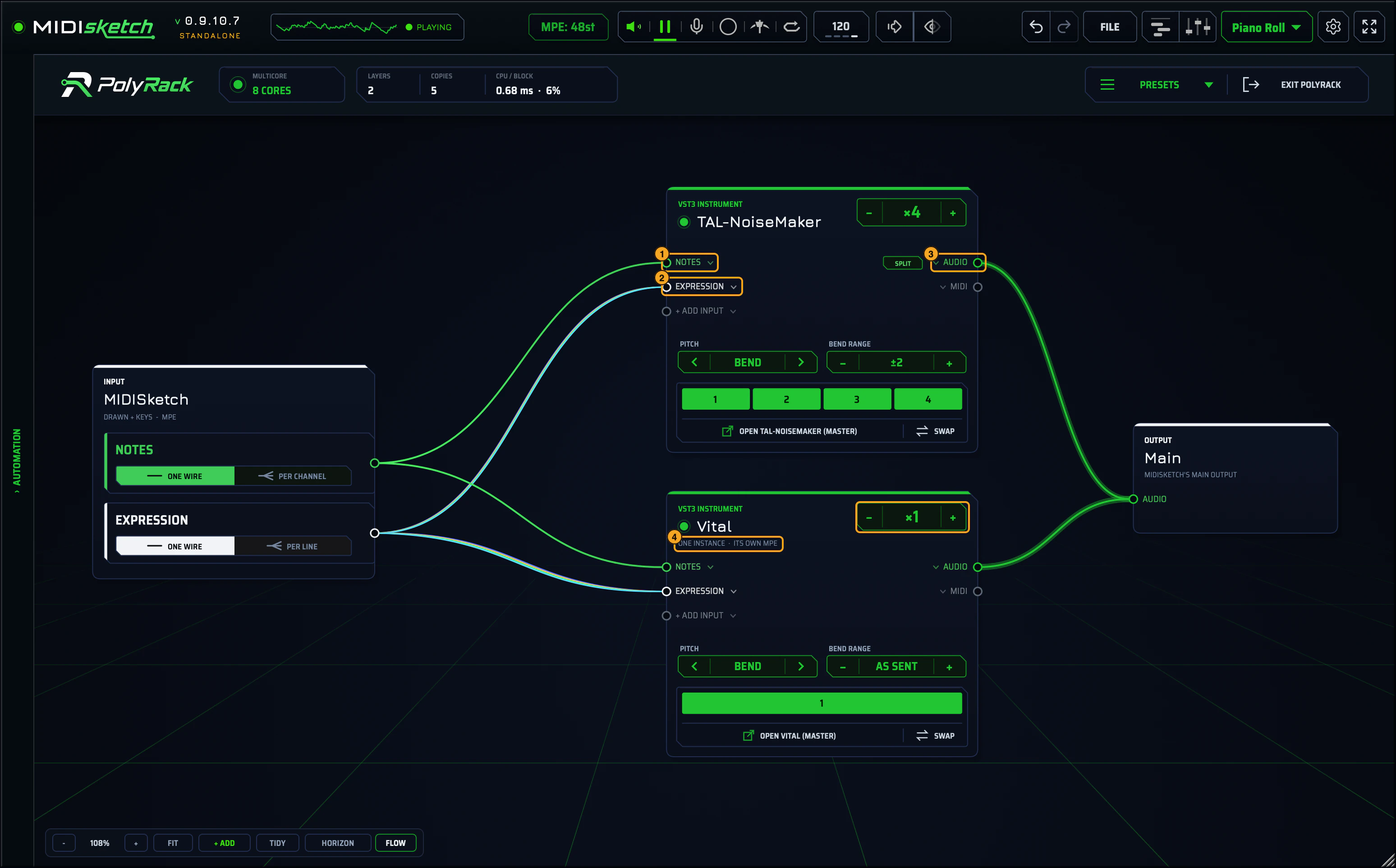
- 1The NOTES port.
- 2The EXPRESSION port.
- 3The AUDIO port.
- 4Vital: one instance, its own MPE.
Building a rack
The canvas: cards and wires
Everything on the canvas is a card, and cards connect with wires. Drag from an output port (right side of a card) to a matching input (left side). Grab a wire by its input end to move it or pull it off, or drop one on empty canvas for a menu of what to put there.
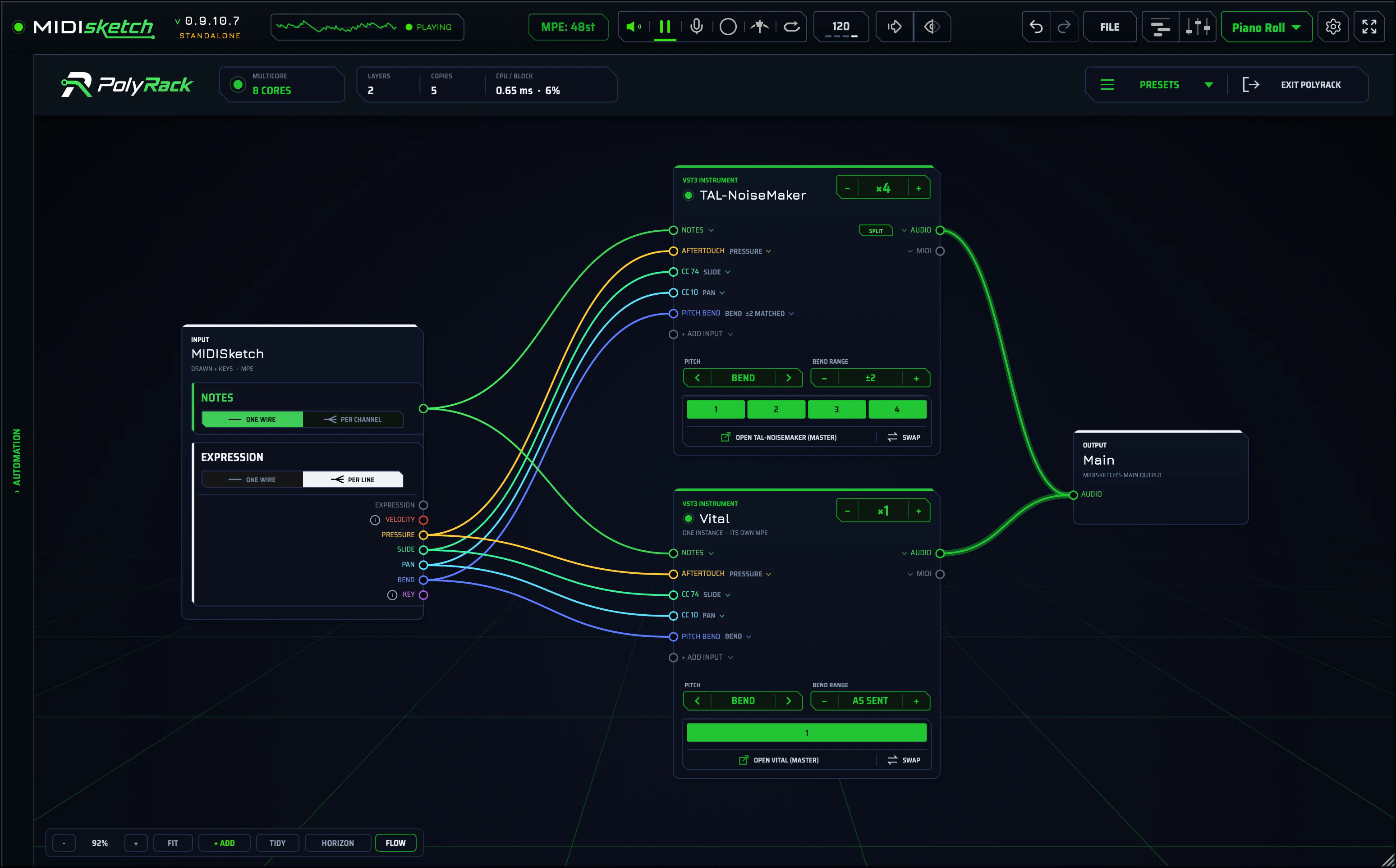
On the MIDISketch card, ONE WIRE / PER CHANNEL splits the notes by MIDI channel, and ONE WIRE / PER LINE splits expression into its separate lines. A split synth input shows where each line lands: AFTERTOUCH (pressure), CC 74 (slide), CC 10 (pan) and PITCH BEND. You can re-wire any line to any input.
The toolbar
Zoom with the mouse wheel, one even step per click, or scroll and pinch on a trackpad.
Adding things: + ADD and the quick wheel
+ ADD opens the add menu. Only the new card gets placed: the cards already on the canvas stay where they are, until you TIDY.
Middle C follows your Middle C setting: it is MIDI note 60, which MIDISketch calls C4 or C5 depending on that setting.
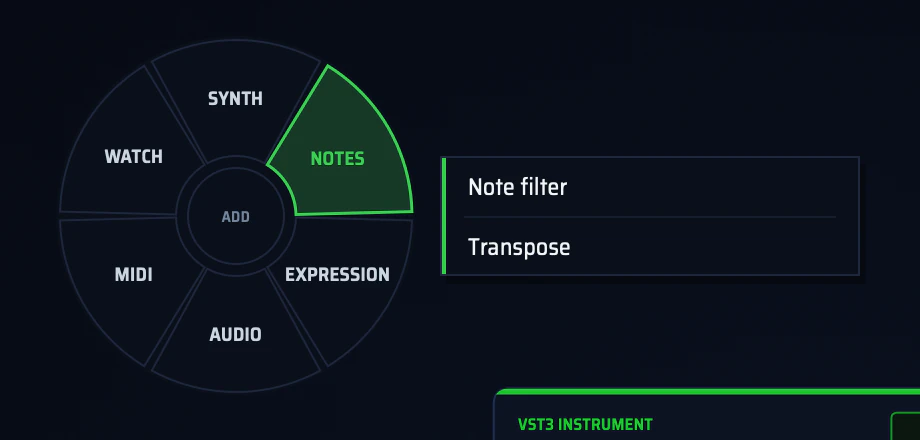
Right-click anything for its options. Hold the right mouse button instead for the quick wheel: drag toward a section, then release on an item.
- On empty canvas the wheel adds things: SYNTH, NOTES, EXPRESSION, AUDIO, MIDI, WATCH. With no synth loaded yet, it offers Pick the main synth…, which opens the instrument browser.
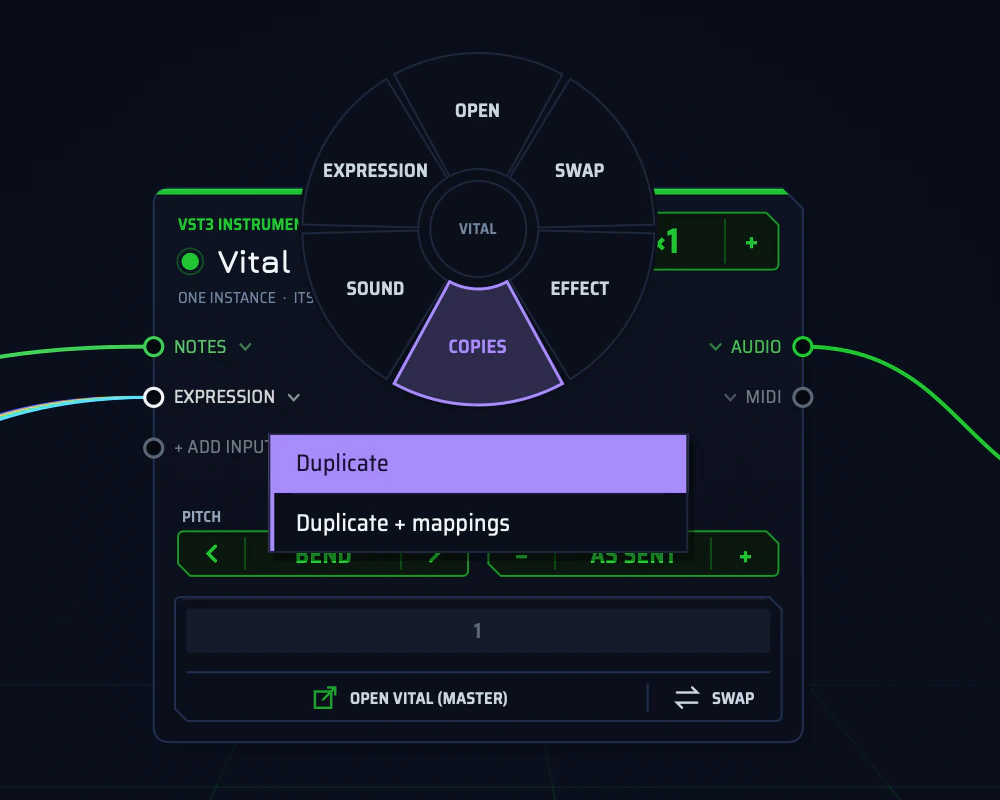
- On a synth card it offers OPEN, SWAP, EFFECT, COPIES, SOUND and EXPRESSION.
Effects and Mix
Effects go in three places:
A Mix card sums whatever you wire into it, with a level knob per input; wire it on to an effect or an output. There’s also an FX return for send effects (each layer gets a send) and Effect on Main output.
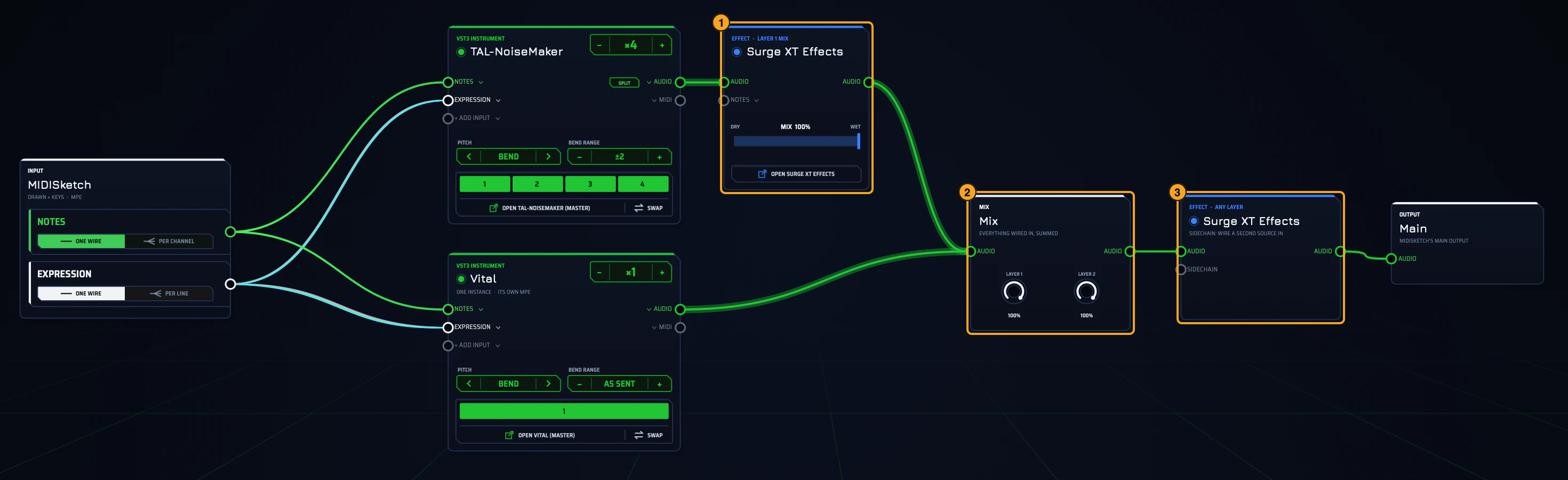
- 1An effect on TAL-NoiseMaker’s mix.
- 2A Mix card summing both layers.
- 3A free effect after the mix, with a sidechain input.
Notes nodes
Notes nodes sit between MIDISketch’s NOTES and your synths, and change which notes get through:
Chain them, and send different chains to different layers: a pad that only plays from middle C up, and a bass an octave down.
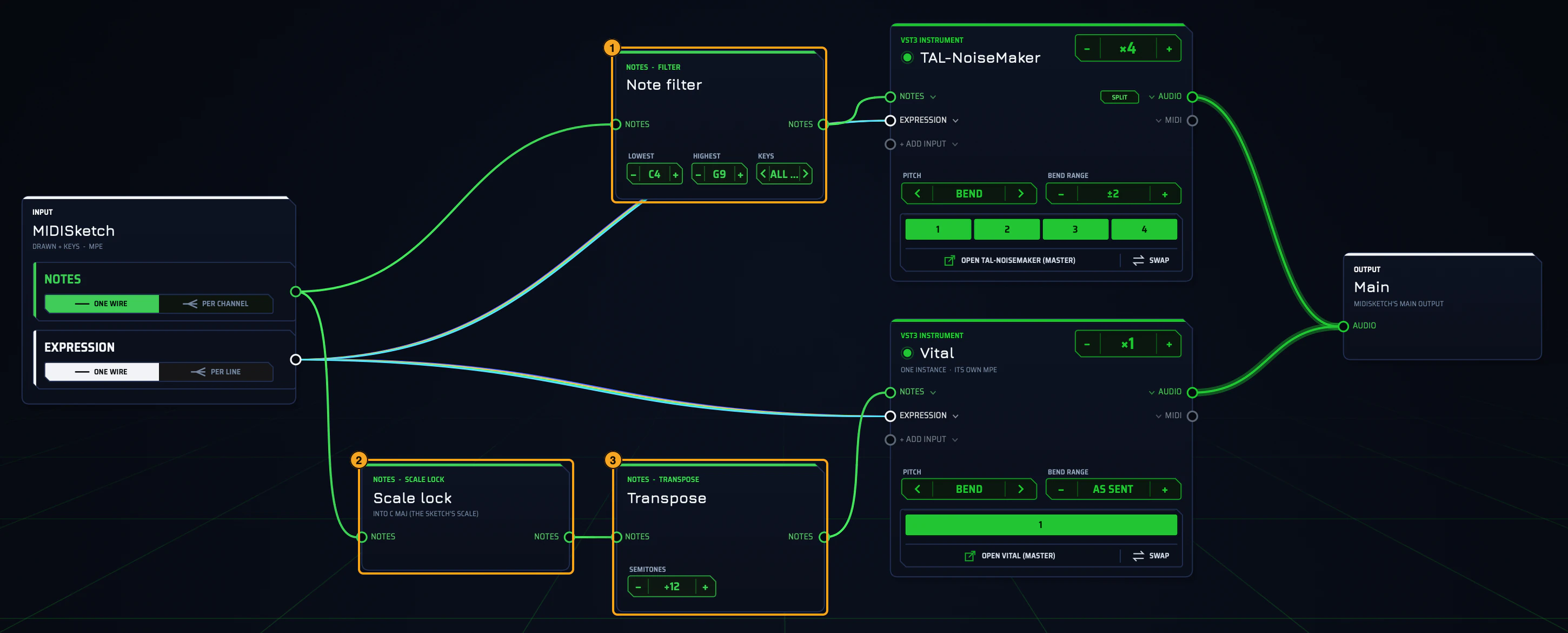
- 1A note filter (C4 and up) in front of TAL-NoiseMaker.
- 2Scale lock, in front of Vital.
- 3Transpose +12, also in front of Vital.
Shaping expression: CURVE and MATH
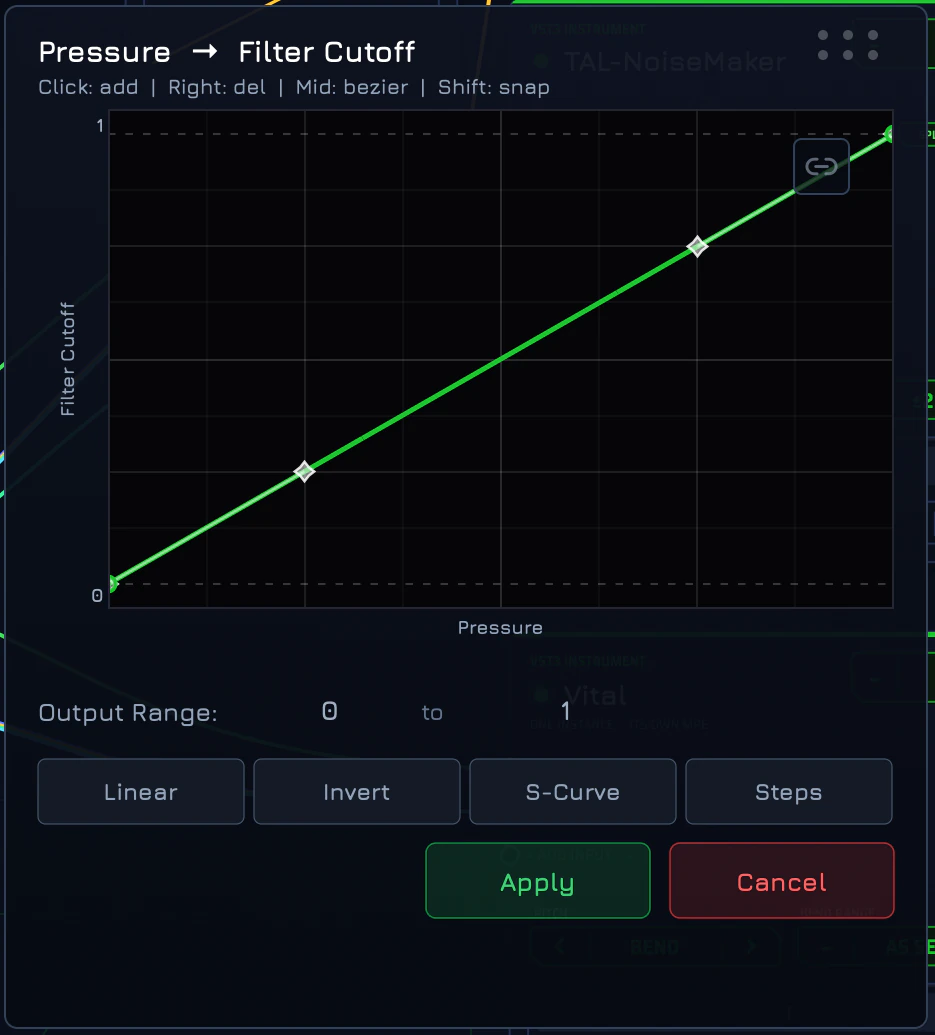
Any expression line can drive any synth parameter or MIDI CC. + ADD INPUT on a synth card adds a target: a synth parameter (search by name, or Learn and turn a knob in the synth’s window), a CC, aftertouch or pitch bend. Then drag a line (pressure, slide, velocity…) into it. In between you can put:
Both work per note: each copy gets its own result.
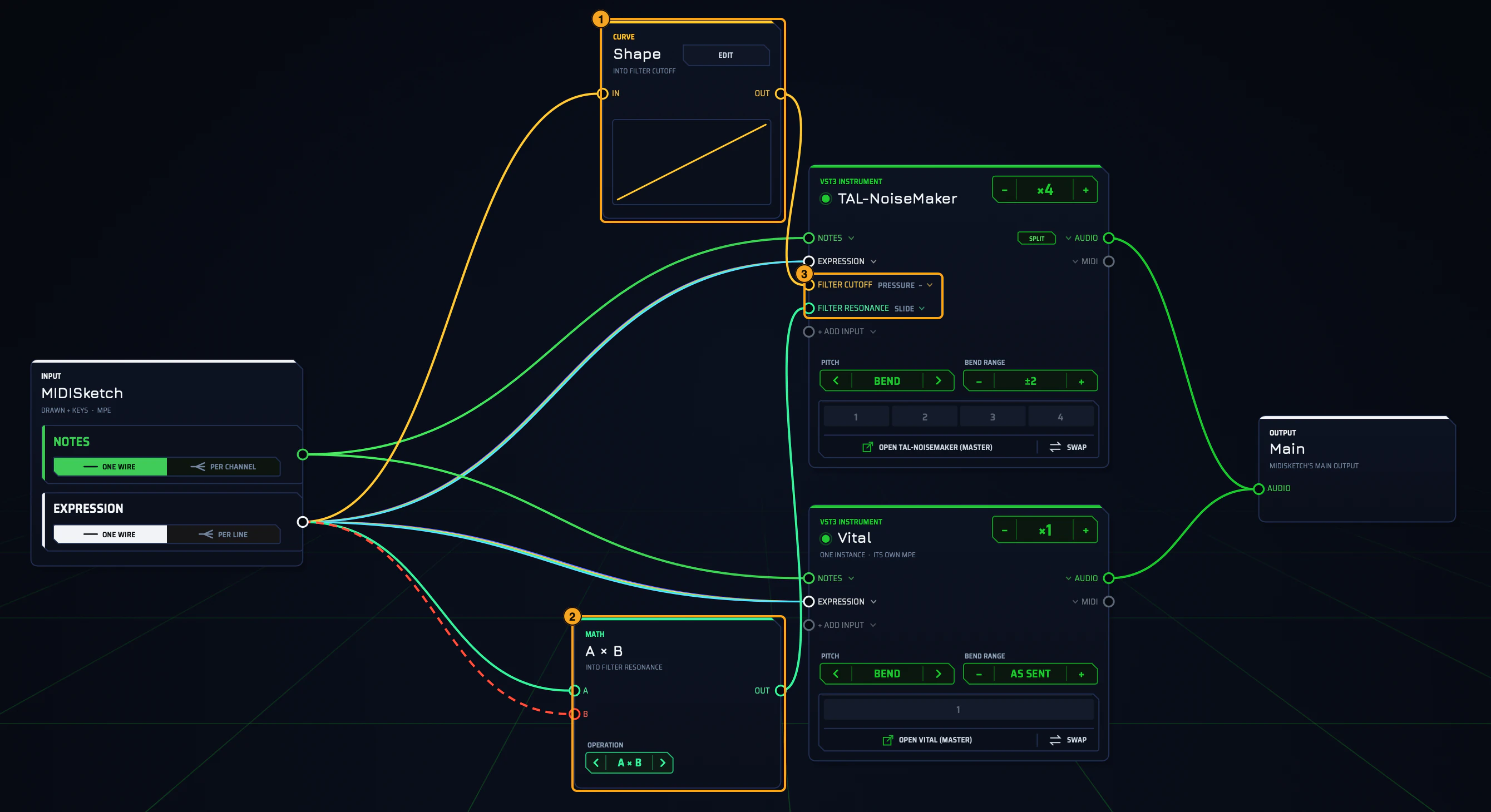
- 1Pressure through a CURVE into Filter Cutoff.
- 2Slide × Velocity through MATH into Filter Resonance.
- 3The two inputs added on the synth card.
Input cards and controllers
By default MIDISketch’s card carries everything: what you drew, your computer keys and your MIDI controllers. Give an input its own card (+ ADD › Add an input: any open MIDI port, Computer keys, or the Trackpad) and it starts out still wired into MIDISketch’s card. Drag its wire to a synth instead and that controller gets its own sound.
- A controller card brings in one MIDI CC (the last one you moved, or else the mod wheel) and drives a module’s macro.
- The CC LANES card is where the CC lanes you draw in the roll come into the rack. Wire them on like any other line.
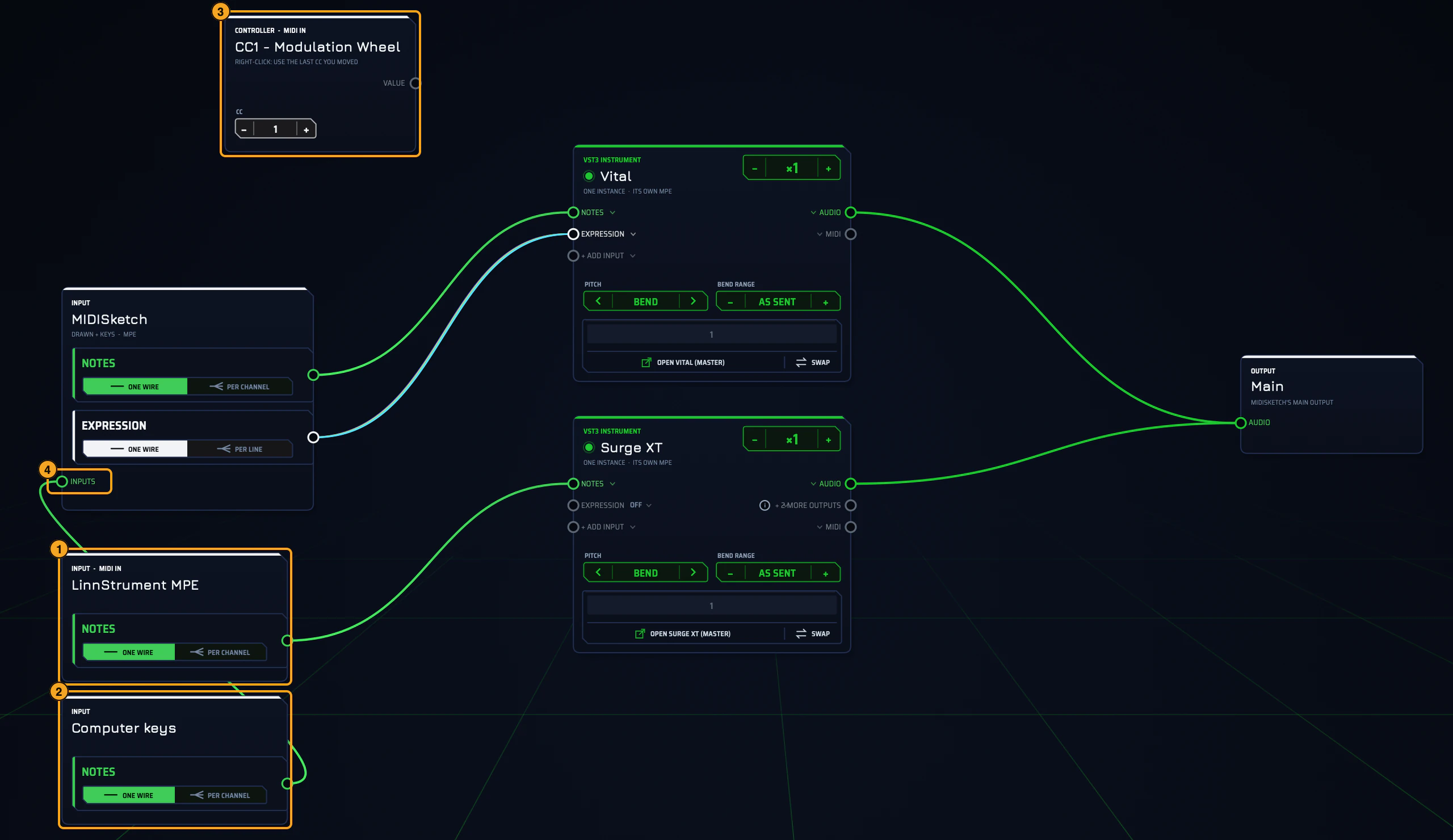
- 1A MIDI port on its own card, playing Surge XT.
- 2Computer keys, still feeding MIDISketch’s card.
- 3A controller card (CC 1).
- 4MIDISketch’s INPUTS port, where the computer keys arrive.
Tools
Watching the signal: Monitor and MIDI log
Drag any wire into a Monitor to see it: notes light a keyboard, expression draws its lines, audio shows a level. A MIDI log lists every message on a wire (time, channel, note, velocity and the raw bytes), handy when a synth doesn’t react the way you expect. Right-click the log to show, pause, clear or copy it.
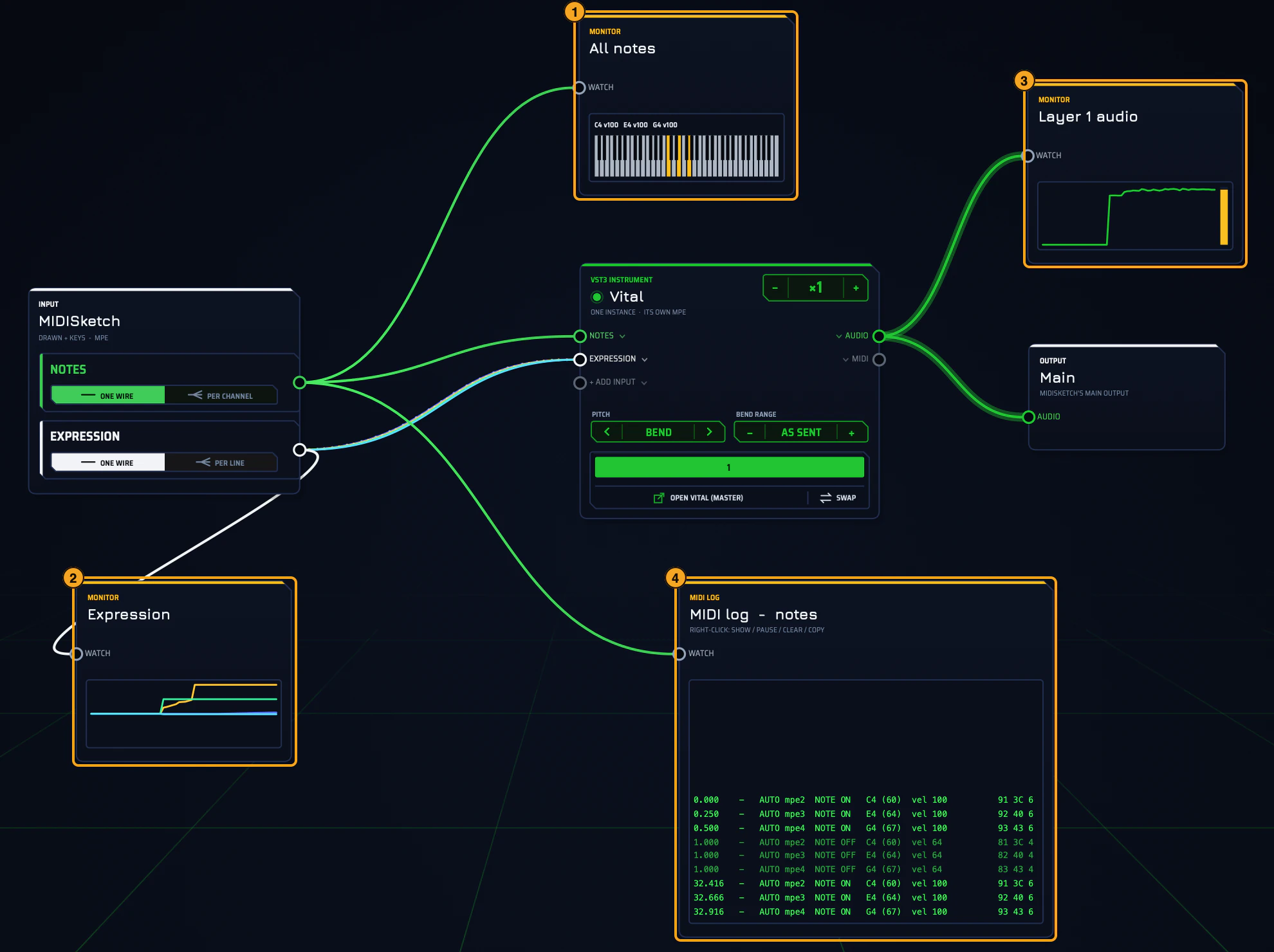
- 1A monitor on the notes.
- 2A monitor on the expression.
- 3A monitor on Vital’s audio.
- 4A MIDI log of the notes.
Modules
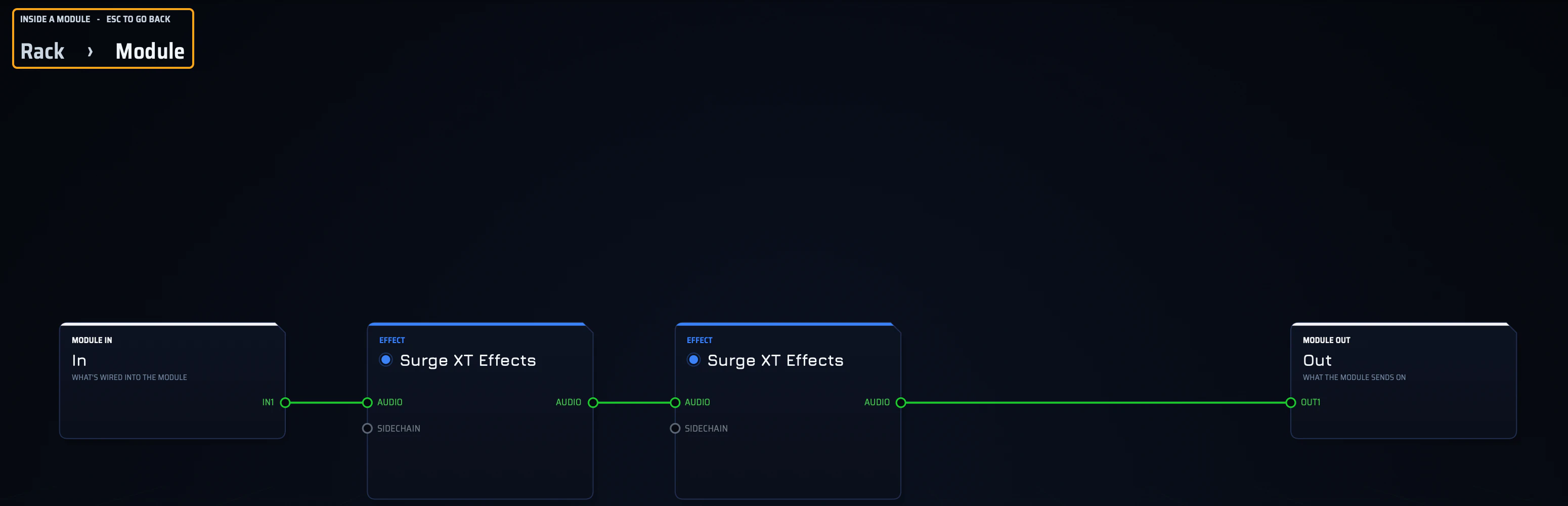
Select several cards (Cmd-drag a box, or Cmd-click cards) and press Cmd+G (Ctrl+G on Windows) to group them into a module: one tidy card with the same inputs and outputs. OPEN MODULE steps inside; a breadcrumb shows where you are, and Esc steps back out.


- Copies of a module are linked (LINKED COPIES SHARE IT): edit inside one and every copy follows.
- Right-click a module to save it to My modules (it then appears under + ADD › My modules) or to make one copy unique.
- Grouping works on free cards (effects, mix, notes nodes and the like), not on synth layers.
- If a lane or controller drives one of the selected cards, grouping is refused: disconnect it first.
Copy, paste, duplicate, undo
- Cmd+C / Cmd+V (Ctrl on Windows) copy and paste cards: the cards only, without their wires.
- Cmd+D duplicates the selected cards (or the card you clicked last) with their wiring, just below.
- Shift-drag a card to drag out a duplicate with its wiring.
- Cmd+Z / Cmd+Shift+Z undo and redo rack edits.
- On a synth card, Duplicate or Duplicate + mappings (right-click, or the wheel’s COPIES) makes a second layer of the same synth and sound.
Presets and Init
PRESETS (top right) saves the whole rack as a preset, loads saved ones and opens the presets folder. Init returns to the default rack (it asks first). The MULTICORE switch spreads the copies over your CPU cores, and the header shows layers, copies and CPU per block.
Reference
Keyboard shortcuts
| Action | Mac | Windows |
|---|---|---|
| Copy cards (no wires) | Cmd+C | Ctrl+C |
| Paste cards | Cmd+V | Ctrl+V |
| Duplicate with wiring | Cmd+D | Ctrl+D |
| Group into a module | Cmd+G | Ctrl+G |
| Undo / redo rack edits | Cmd+Z / Cmd+Shift+Z | Ctrl+Z / Ctrl+Shift+Z |
| Box-select | Cmd-drag on empty canvas | Ctrl-drag |
| Add / remove a card from the selection | Cmd-click | Ctrl-click |
| Duplicate by dragging | Shift-drag a card | Shift-drag |
| Leave a module | Esc | Esc |
| Stop all sound (panic) | Esc on the rack, outside a module | Esc |
| Options | Right-click | Right-click |
| Quick wheel | Hold right-click, drag, release | The same |
FAQ
Why copies?
Ordinary synths get one pitch bend and one pressure for every note at once. With one copy per note, each note has a synth to itself, so it can bend and swell on its own.
Does it use more CPU?
Yes. Each copy is a full synth instance, so four copies cost roughly four synths while they play. Idle copies can sleep, and MULTICORE spreads copies across CPU cores. Use as many copies as the largest chord you play; MPE-ready synths need just one instance.
Which synths are MPE-ready?
Those on MIDISketch's verified MPE list, for example Vital, Serum 2 and Surge XT. They open as one instance; everything else opens as copies. The synth setup page covers the synths MIDISketch knows.
Will my synth's sound and settings carry over?
Yes. The PolyRack button on a loaded synth keeps its sound and settings, and every copy follows the master window.
A plug-in crashed MIDISketch. What now?
Open your sketch again. If a plug-in closed MIDISketch while the sketch was opening, the next open skips that plug-in once and tells you. It stays in the rack as a card, so the sketch is safe to save.
Does it work in my DAW?
PolyRack is in the MIDISketch 0.9.10.8 beta, built into MIDISketch itself (not the MIDI FX version), and rack audio can go to MIDISketch's main output, to separate outputs for DAW mixer tracks, or out as MIDI. Tested in your DAW? Tell us on Discord.
Is it finished?
Not yet: it is in beta. This page grows as it does.